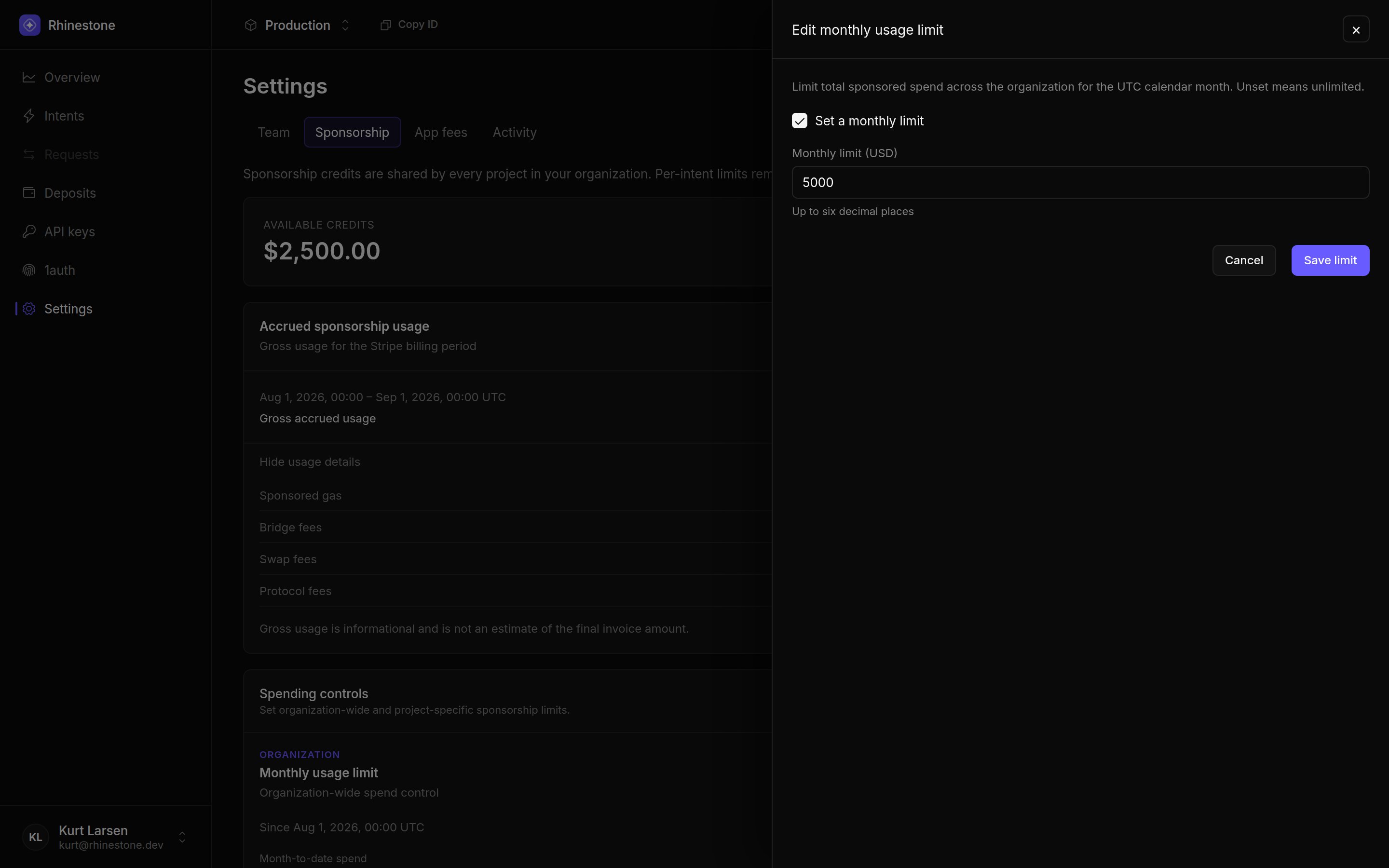
Restrict sponsorship issuance and bound spend at the project and organization levels.
Treat sponsorship authority as permission to spend your organization’s money. Authenticate callers, validate every requested intent on the backend, and configure spend limits as a separate backstop.
createSponsorshipSigner({ shouldSponsor }) runs its filter before Rhinestone receives an extension token. For EVM, create the signer for the authenticated request, using the account address your application session is allowed to use:
import { createSponsorshipSigner } from "@rhinestone/wallet/server";const signer = createSponsorshipSigner({ shouldSponsor: { chain: ({ id }) => SPONSORED_CHAIN_IDS.has(id), account: (address) => address.toLowerCase() === accountAddress.toLowerCase(), calls: (calls) => calls.every( ({ to, value, data }) => ALLOWED_CONTRACTS.has(to.toLowerCase()) && ALLOWED_SELECTORS.has(data.slice(0, 10)) && value <= MAX_CALL_VALUE, ), },});
The destination chain, account, and destination calls must all pass. Follow Set up to connect the signer to your token endpoints.This section describes the embedded-wallet SDK’s canonical input, not the raw Caucasus HTTP schema. createSponsorshipSigner() accepts a canonical draft or a prepared envelope containing intentInput, and normalizes it before running shouldSponsor.Use shouldSponsor.intent to validate the complete normalized input. Narrow on "contractVersion" in input before reading singular fields such as account.svm, source, destination, and options; legacy inputs use destinationChainId, account.address, and destinationExecutions. The current singular approval contract is sdk-3.0.0-caucasus; unknown or retired contracts are refused. See the migration guide for compatible versions.The individual chain, account, calls, and app-fee filters do not validate source assets, delivery amounts, recipients, or instruction data. Validate these through the full intent filter when they affect your policy.For each EVM extension-token request:
Authenticate the caller with your normal application session.
Resolve the smart account that your session is allowed to use.
Validate policy fields outside the built-in filter against the complete intent payload.
Configure the account filter with the resolved address.
Check every destination target, function selector, calldata rule, and value limit your product requires.
Return 403 without minting a token when any check fails.
verifyWalletAccount() from @rhinestone/wallet/server can confirm that an address is recognized by the embedded wallet provider. Your application session must still establish that the current user is allowed to use it.
For Solana-only setup and spends, chain and intent filters apply. The chain callback receives the destination ID: 792703809 for Solana mainnet and 792703810 for devnet. Presence of any EVM account, calls, or appFees filter rejects the input, even if that callback would return true. The EVM example above therefore does not allow Solana.Use an authenticated, VM-aware policy that binds account.svm and the intended Swig, cluster, and authority to the session. Compare base58 addresses exactly. Validate the full source, destination, options, and ordered instruction data; do not authorize arbitrary instructions from a program allowlist alone.The helper accepts Swig creation and authority additions only for secp256r1 passkeys with all or secp256k1 recovery keys with manageAuthority. Authority removal and other permissions are refused. Accepted shapes are not proof that an authority belongs to the user: your policy must check the exact key and purpose. Managed setup fees and rent are app-paid, without user fallback.See Solana setup and recovery and authority limits.
Rhinestone verifies that the JWT signing key belongs to the project, that access and extension token identity claims match, and that the extension token’s jti has not already been used. The extension token also carries the canonical intent digest.An issuance filter alone does not prevent a client from changing the payload afterward. The embedded wallet browser flow returns the extension token to the client, so use compatible client and server helpers that issue intent-scoped grants under the matching approval contract. Do not infer intent binding from JWT authentication or a version header alone.
CORS and cookie attributes only constrain compatible browsers. They do not
stop a script from calling a public endpoint. Use them as browser hardening,
not as authorization.
Rotate signing keys by registering a new kid, switching issuance, then disabling the old key after outstanding tokens expire.Do not switch a rejected sponsored transaction to user-paid at submission time. With embedded wallets, sponsorshipMode: "required" remains fail-closed; to fall back, send a new intent with "disabled" and an explicit source, which the user reviews before signing. This send fallback does not apply to managed Solana setup, which is app-paid only. See Sponsor fees before enabling fallback.
With backend-held API keys, bind the request to the authenticated user’s account and validate every field that affects your policy before preparing a transaction. This EVM application-owned handler is a policy skeleton, not an SDK transaction or JWT approval input:
const session = await requireApplicationSession(request);const transaction = await request.json();const accountAddress = await accountForSession(session);if ( transaction.accountAddress.toLowerCase() !== accountAddress.toLowerCase() || !policyAllows(transaction)) { return Response.json({ error: "not sponsorable" }, { status: 403 });}// Continue with the backend-held Rhinestone SDK only after validation.
Resolve the SDK account from the session rather than trusting a client-supplied address. Check the selected source.chain and source.token, any maxAmount, auxiliary funds and source calls, and the nested destination’s chain, token, amount, recipient, calls, and gas limit. Validate sponsorship, app fees, protocol fees, deadlines, and route filters too. Do not accept an already prepared payload without applying the same checks. Keep final validation and submission on your backend when clients are not trusted.
For Solana, bind the managed wallet, Swig, cluster, and intended authority to the session. Compare base58 addresses exactly; do not lowercase them like EVM addresses. Validate selected mints, source debit caps, delivery amount and recipient, sponsorship, and any requested fees. Solana-origin requests do not accept EVM auxiliary funds, source calls, deadlines, or route filters.For instruction execution, allowlist programs and check ordered account metadata, writable/signing flags, decoded instruction data, recipients, transfer amounts, and address lookup tables. A program allowlist alone is insufficient. Deployment installs a permanent root; authority management can grant takeover power. Authorize these operations explicitly, separately from ordinary transfers, and account for sponsorship and rent costs. See Solana readiness.
For experimental_jwt clients, deploy backend helpers that accept sdk-3.0.0-caucasusbefore upgrading clients. The SDK passes getIntentExtensionToken the versioned approval input once per sponsored prepare, before requesting a quote. It does not request or present the grant at submission, including submission of restored prepared data. Denial or failure stops preparation without an unsponsored fallback.Validate the complete approval input: contractVersion, per-VM account, optional singular source, nested destination, and options. Bind account.evm.address to the authenticated session for EVM flows and validate the account configuration, not just its address. Approval fields use wire values: CAIP-2 chain IDs, native address strings, decimal-string amounts, and destination.execution.calls, not the SDK request’s viem chains and bigint amounts.Sponsorship appears only at options.sponsorship, with gas, bridgeFees, swapFees, and protocolFees. These are wire names; SDK requests still use top-level sponsored with bridging and swaps. Preserve explicit false values and array order, omit absent source, and default absent options to {}. Intent-scoped grants bind the lowercase SHA-256 digest of RFC 8785 canonical JSON. See the canonical input and digest contract.shouldSponsor from @rhinestone/sdk/jwt-server checks only the destination chain, account address, and destination calls (or HyperCore settlement calls). It does not authorize the source, delivery token or amount, recipient, account setup, or options. Check those separately against the complete input before issuing a grant. For Solana, validate wire account.svm and destination.execution directly: the helper does not inspect instructions or authority changes. It selects the EVM account address when both entries exist, otherwise the SVM address; an empty calls list must not authorize arbitrary Solana execution. Reject unsupported contracts or fields; do not translate a v3 input into legacy field names to reuse an old policy.A rejected sponsored request does not silently become user-paid. Prepare a new self-funded quote and obtain user approval if your application offers that fallback. See Sponsor fees for selective sponsorship controls.
Before issuing a singular intent-bound grant, authenticate the session, bind the per-VM accounts to it, and validate the selected source, nested destination.execution, recipient, and options against your policy. Binding preserves the approved request; it does not establish that your policy safely permits arbitrary client-supplied calls.For singular Caucasus HTTP requests using sponsorship scope intent, the orchestrator recomputes the approved digest from the received body when sponsorship is requested. A digest mismatch or unsupported binding is rejected. This enforcement is conditional on scope and a matching approval contract, not a guarantee for every client-held token. See REST API setup and the canonical input and digest contract.Policy rejection, digest mismatch, or unsupported binding fails closed. Revalidate the exact supported body and issue a fresh matching grant where permitted; do not bypass binding or switch to user-paid at submission. A user-paid alternative needs a new quote and user approval.
Admission based on recorded month-to-date spend plus the projected charge, across every project during the UTC calendar month.
Gas per intent
Selected project
Sponsored gas for one intent.
Bridge fee per intent
Selected project
Sponsored bridge fees for one intent.
Total per intent
Selected project
The total sponsorship charge for one intent, including the sponsorship surcharge and any sponsored protocol fee.
Set an organization-wide monthly usage limit in the Dashboard.
Unset limits are unlimited. Project caps do not divide or reserve the organization budget; every project draws from the same organization sponsorship account. The monthly limit does not reserve funds between concurrent intents, so simultaneous admissions can exceed it before their charges are recorded. Testnet sponsorship is not metered against these mainnet limits.
Request validation answers “should this intent be sponsored?” Budgets answer
“can this sponsorship account pay for it?” Use both.
Backend validation or shouldSponsor rejects the intent
No sponsored transaction or extension token is produced.
Keep the flow unsponsored or reject it according to your product policy.
Token is expired, mismatched, or replayed
Rhinestone rejects authentication or the sponsorship grant.
Mint a fresh token for the unchanged request. Re-evaluate policy before retrying.
Intent-bound grant digest mismatches or binding is unsupported
The sponsored quote is rejected.
Revalidate the supported body and policy before issuing a fresh matching grant.
Project per-intent cap is exceeded
The sponsored quote is rejected.
Reduce the sponsored scope or request a new user-paid quote.
Organization monthly limit is reached
Sponsorship is rejected across the organization’s projects.
Raise the limit or request a new user-paid quote.
Billing is suspended or available credits are exhausted without active billing
Sponsorship is rejected.
Restore billing or request a new user-paid quote.
Funding affects the quote and the operations the user authorizes. A user-paid fallback always needs a new quote and user approval. Managed Solana setup has no such fallback; restore sponsorship or leave setup unfinished.
Keep private keys and API keys in backend secret storage.
Authenticate token-minting and transaction endpoints.
Bind every account to the authenticated application session.
Allowlist chains, contracts, functions, and values as narrowly as possible.
Set project per-intent caps and an organization monthly limit.
Log policy denials without logging tokens, private keys, or sensitive request data.
Was this page helpful?
{"docsConfig":{"theme":"mint","$schema":"https://mintlify.com/docs.json","name":"Rhinestone","colors":{"primary":"#4f41ef","light":"#8479ff","dark":"#3428d1"},"logo":{"light":"https://mintcdn.com/rhinestone/IVpDy9zUkncYAe5u/logo/light.svg?fit=max\u0026auto=format\u0026n=IVpDy9zUkncYAe5u\u0026q=85\u0026s=6868a5854576ff60d371d5fdc0ae55c9","dark":"https://mintcdn.com/rhinestone/IVpDy9zUkncYAe5u/logo/dark.svg?fit=max\u0026auto=format\u0026n=IVpDy9zUkncYAe5u\u0026q=85\u0026s=2f9bff4fef6da993b8782b8e5d7357c5"},"favicon":"https://mintcdn.com/rhinestone/BVnq0VV8MigHINpS/favicon.svg?fit=max\u0026auto=format\u0026n=BVnq0VV8MigHINpS\u0026q=85\u0026s=25439e41b789b8369c52fa15ceae2644","appearance":{"default":"dark","strict":true},"background":{"color":{"dark":"#0C0C0C"}},"navbar":{"links":[{"href":"https://dashboard.rhinestone.dev","label":"Dashboard"},{"href":"https://github.com/rhinestonewtf","label":"GitHub"}]},"icons":{"library":"lucide"},"contextual":{"options":["copy","view","claude","chatgpt"],"display":"header"},"styling":{"latex":true},"navigation":{"global":{"anchors":[{"anchor":"Create API Key","icon":"key","href":"https://tally.so/r/wg22x4"}]},"pages":[]}},"deployment":{"deploymentMetadataValue":{"subdomain":"rhinestone","hasAudioNarration":false,"actualSubdomain":"rhinestone","customDomains":["docs.rhinestone.dev"],"gitSource":{"type":"github","owner":"rhinestonewtf","repo":"docs","deployBranch":"main","contentDirectory":"","isPrivate":true,"mountPath":"","label":""},"chroma":{"liveDeploymentHistoryId":"6aeb4295a60f76c94453464a","collectionId":"7618524b-8144-4f55-a620-58d79fbeddf2","schemaVersion":"v3","latestBuiltDeploymentHistoryId":"6aeb4295a60f76c94453464a"},"feedback":{"thumbs":true},"entitlements":{"AI_CHAT":{"status":"ENABLED"},"WEB_MCP":{"status":"ENABLED"},"NARRATION":{"status":"ENABLED"}},"buildId":"6aeb4295a60f76c94453464a","clientVersion":"0.0.4074","searchFilterCounts":[{"language":"default","tag":"Wallets","count":153},{"language":"default","tag":"Custom signer","count":107},{"language":"default","tag":"Deposits","count":88},{"language":"default","tag":"SDK reference","count":74},{"language":"default","tag":"API Reference","count":67},{"language":"default","tag":"Transactions","count":30},{"language":"default","tag":"Account","count":28},{"language":"default","tag":"Overview","count":25},{"language":"default","tag":"Actions","count":25},{"language":"default","tag":"Session keys","count":21}]},"assistantConfig":{},"basePath":"","hasChatPermissions":true,"hasWebMcpPermissions":true,"toggles":[{"name":"kill-isr","enabled":true,"variant":{"name":"disabled","enabled":false,"feature_enabled":true},"impressionData":false},{"name":"agent-mintlify-slack","enabled":true,"variant":{"name":"disabled","enabled":false,"feature_enabled":true},"impressionData":false},{"name":"agent-integrations-settings","enabled":true,"variant":{"name":"disabled","enabled":false,"feature_enabled":true},"impressionData":false},{"name":"rbac-expansion","enabled":true,"variant":{"name":"disabled","enabled":false,"feature_enabled":true},"impressionData":false},{"name":"automations-pr-grouping","enabled":true,"variant":{"name":"disabled","enabled":false,"feature_enabled":true},"impressionData":false},{"name":"custom-prefix","enabled":true,"variant":{"name":"disabled","enabled":false,"feature_enabled":true},"impressionData":false},{"name":"analytics-v7","enabled":true,"variant":{"name":"disabled","enabled":false,"feature_enabled":true},"impressionData":false},{"name":"user-flows-analytics","enabled":true,"variant":{"name":"disabled","enabled":false,"feature_enabled":true},"impressionData":false},{"name":"no-publish-flow","enabled":true,"variant":{"name":"disabled","enabled":false,"feature_enabled":true},"impressionData":false},{"name":"workos-onboarding","enabled":true,"variant":{"name":"disabled","enabled":false,"feature_enabled":true},"impressionData":false},{"name":"llms-txt-v2","enabled":true,"variant":{"name":"disabled","enabled":false,"feature_enabled":true},"impressionData":false},{"name":"snapshot-serving-live","enabled":true,"variant":{"name":"disabled","enabled":false,"feature_enabled":true},"impressionData":false},{"name":"stripTemperatureMiddleware","enabled":true,"variant":{"name":"disabled","enabled":false,"feature_enabled":true},"impressionData":false},{"name":"support-platform-pylon-zendesk","enabled":true,"variant":{"name":"disabled","enabled":false,"feature_enabled":true},"impressionData":false},{"name":"snapshot-serving","enabled":true,"variant":{"name":"disabled","enabled":false,"feature_enabled":true},"impressionData":false},{"name":"instant-rollback","enabled":true,"variant":{"name":"disabled","enabled":false,"feature_enabled":true},"impressionData":false},{"name":"granular-notifications-server","enabled":true,"variant":{"name":"disabled","enabled":false,"feature_enabled":true},"impressionData":false},{"name":"granular-notifications","enabled":true,"variant":{"name":"disabled","enabled":false,"feature_enabled":true},"impressionData":false},{"name":"automations-fable","enabled":true,"variant":{"name":"disabled","enabled":false,"feature_enabled":true},"impressionData":false},{"name":"fixed-ai-action-pricing","enabled":true,"variant":{"name":"disabled","enabled":false,"feature_enabled":true},"impressionData":false},{"name":"automation-resolve-merge-conflict","enabled":true,"variant":{"name":"disabled","enabled":false,"feature_enabled":true},"impressionData":false},{"name":"scoped-publishing","enabled":true,"variant":{"name":"disabled","enabled":false,"feature_enabled":true},"impressionData":false},{"name":"mintql","enabled":true,"variant":{"name":"disabled","enabled":false,"feature_enabled":true},"impressionData":false},{"name":"page-level-analytics","enabled":true,"variant":{"name":"disabled","enabled":false,"feature_enabled":true},"impressionData":false},{"name":"editor-version-history-v2","enabled":true,"variant":{"name":"disabled","enabled":false,"feature_enabled":true},"impressionData":false},{"name":"billing-page-v2","enabled":true,"variant":{"name":"disabled","enabled":false,"feature_enabled":true},"impressionData":false},{"name":"full-page-search","enabled":true,"variant":{"name":"disabled","enabled":false,"feature_enabled":true},"impressionData":false},{"name":"workspace-projects","enabled":true,"variant":{"name":"disabled","enabled":false,"feature_enabled":true},"impressionData":false},{"name":"assistant-v5","enabled":true,"variant":{"name":"disabled","enabled":false,"feature_enabled":true},"impressionData":false},{"name":"fork-pr-previews","enabled":true,"variant":{"name":"disabled","enabled":false,"feature_enabled":true},"impressionData":false},{"name":"revalidation-jwt","enabled":true,"variant":{"name":"disabled","enabled":false,"feature_enabled":true},"impressionData":false},{"name":"vite-origin","enabled":true,"variant":{"name":"disabled","enabled":false,"feature_enabled":true},"impressionData":false},{"name":"workos-sso-scim","enabled":true,"variant":{"name":"disabled","enabled":false,"feature_enabled":true},"impressionData":false},{"name":"hobby-abuse-scan","enabled":true,"variant":{"name":"disabled","enabled":false,"feature_enabled":true},"impressionData":false},{"name":"dashboard-inbox","enabled":true,"variant":{"name":"disabled","enabled":false,"feature_enabled":true},"impressionData":false},{"name":"workos-signup","enabled":true,"variant":{"name":"disabled","enabled":false,"feature_enabled":true},"impressionData":false},{"name":"turbopuffer-dual-write","enabled":true,"variant":{"name":"disabled","enabled":false,"feature_enabled":true},"impressionData":false},{"name":"workos-enabled","enabled":true,"variant":{"name":"disabled","enabled":false,"feature_enabled":true},"impressionData":false},{"name":"approve-review-flow","enabled":true,"variant":{"name":"disabled","enabled":false,"feature_enabled":true},"impressionData":false},{"name":"sso-setup-deadline-banner","enabled":true,"variant":{"name":"disabled","enabled":false,"feature_enabled":true},"impressionData":false},{"name":"turbopuffer-serve","enabled":true,"variant":{"name":"disabled","enabled":false,"feature_enabled":true},"impressionData":false},{"name":"live-agents","enabled":true,"variant":{"name":"disabled","enabled":false,"feature_enabled":true},"impressionData":false},{"name":"comment-mode","enabled":true,"variant":{"name":"disabled","enabled":false,"feature_enabled":true},"impressionData":false}],"googleFontsInlined":false},"customCss":[{"filePath":"style.css","content":":root{--background: #0C0C0C}.vm-code-group{--vm-menu-bg: #fff;--vm-menu-border: rgb(0 0 0 / 10%);--vm-hover: rgb(0 0 0 / 5%);margin:1.5rem 0;border:1px solid #404045;border-radius:12px}.dark .vm-code-group{--vm-menu-bg: #171717;--vm-menu-border: rgb(255 255 255 / 10%);--vm-hover: rgb(255 255 255 / 7%)}.vm-code-group-header{display:flex;align-items:center;justify-content:space-between;gap:0.75rem;padding:0.375rem 0.75rem;border-bottom:1px solid #404045;font-size:0.8125rem}.vm-code-caption{flex:1;min-width:0;overflow:hidden;text-overflow:ellipsis;white-space:nowrap;opacity:0.65}.vm-code-selector{position:relative;flex:none}.vm-code-trigger,.vm-code-option{display:flex;align-items:center;gap:0.5rem;min-height:32px;padding:0.375rem 0.5rem;border:0;border-radius:6px;background:transparent;color:inherit;font:inherit;line-height:1.25;cursor:pointer}.vm-code-trigger:hover,.vm-code-trigger[aria-expanded=\"true\"],.vm-code-option:hover,.vm-code-option:focus{background:var(--vm-hover)}.vm-code-trigger:focus-visible,.vm-code-option:focus-visible{outline:2px solid #8b7bf7;outline-offset:2px}.vm-code-group .vm-code-icon{display:block;flex:none;width:16px;height:16px;margin:0;border-radius:0}.vm-code-chevron{margin-left:0.125rem;opacity:0.55;transition:transform 150ms ease}.vm-code-trigger[aria-expanded=\"true\"] .vm-code-chevron{transform:rotate(180deg)}.vm-code-menu{position:absolute;top:calc(100% + 6px);right:0;z-index:30;min-width:156px;padding:4px;border:1px solid var(--vm-menu-border);border-radius:10px;background:var(--vm-menu-bg);box-shadow:0 8px 24px rgb(0 0 0 / 18%)}.vm-code-option{width:100%;text-align:left}.vm-code-check{margin-left:auto;opacity:0.65}@media (pointer: coarse){.vm-code-trigger,.vm-code-option{min-height:44px}}@media (prefers-reduced-motion: reduce){.vm-code-chevron{transition:none}}.vm-code-group-panel>*{margin:0!important;border:0!important;border-radius:0 0 12px 12px;box-shadow:none!important}.vm-code-group-panel[hidden]{display:none}.prose table{display:table}table{border-collapse:separate;border-spacing:0;border:1px solid #404045;border-radius:8px;width:fit-content!important}table th,table td{border-right:1px solid #404045;border-bottom:1px solid #404045;padding:12px 16px!important}table th:last-child,table td:last-child{border-right:none}table tr:last-child td{border-bottom:none}table th{background-color:#201E2C}table th:first-child{border-radius:8px 0 0 0}table th:last-child{border-radius:0 8px 0 0}[data-component-name=\"mermaid-controls-wrapper\"]{display:none!important}.mermaid svg .actor{fill:#17132E!important;stroke:#373352!important}.mermaid svg rect.actor{rx:6;ry:6}.mermaid svg text.actor>tspan{fill:#D3CFF7!important}.mermaid svg .actor-line{stroke:#464359!important;stroke-width:1!important}.mermaid svg .messageLine0,.mermaid svg .messageLine1{stroke:#464359!important;stroke-width:1.5!important}.mermaid svg #arrowhead path,.mermaid svg [id$=\"-arrowhead\"] path{fill:#464359!important;stroke:#464359!important}.mermaid svg #crosshead path,.mermaid svg [id$=\"-crosshead\"] path{stroke:#464359!important}.mermaid svg .messageText{fill:#C7C6CC!important}.mermaid svg .activation0,.mermaid svg .activation1,.mermaid svg .activation2{fill:#17132E!important;stroke:#373352!important}.mermaid svg .note{fill:#17132E!important;stroke:#373352!important}.mermaid svg .noteText,.mermaid svg .noteText>tspan{fill:#C7C6CC!important}.mermaid svg .loopText,.mermaid svg .loopText>tspan{fill:#C7C6CC!important}.mermaid svg .loopLine{stroke:#373352!important}.mermaid svg .labelBox{fill:#17132E!important;stroke:#373352!important}.mermaid svg .labelText,.mermaid svg .labelText>tspan{fill:#C7C6CC!important}.mermaid svg .sequenceNumber{fill:#D3CFF7!important}.mermaid svg .node rect,.mermaid svg .node circle,.mermaid svg .node ellipse,.mermaid svg .node polygon,.mermaid svg .node path{fill:#17132E!important;stroke:#373352!important}.mermaid svg .nodeLabel,.mermaid svg .node .label{color:#D3CFF7!important;fill:#D3CFF7!important}.mermaid svg .flowchart-link{stroke:#464359!important}.mermaid svg .edgeLabel,.mermaid svg .edge-label{color:#C7C6CC!important;fill:#C7C6CC!important}.mermaid .labelBkg,.mermaid .labelBkg *{background:transparent!important}.mermaid svg .marker{fill:#464359!important;stroke:#464359!important}.dark #sidebar [data-active=\"true\"]{background-color:#141414!important;border-radius:6px}.deposit-demo{container-type:inline-size}.deposit-demo-loading{position:absolute;inset:0;display:grid;place-items:center;margin:0}.deposit-demo-stage:has(iframe[data-ready=\"true\"]) .deposit-demo-loading{visibility:hidden}@container (max-width: 411px){.deposit-demo-stage{--deposit-demo-height: 629px}}"}],"page":{"pagePath":"transactions/sponsorship/policies-and-security","slug":"/transactions/sponsorship/policies-and-security","pageMetadata":{"title":"Policies and security","description":"Restrict sponsorship issuance and bound spend at the project and organization levels.","href":"/transactions/sponsorship/policies-and-security"},"description":{"compiledSource":"\"use strict\";\nconst {jsx: _jsx} = arguments[0];\nconst {useMDXComponents: _provideComponents} = arguments[0];\nfunction _createMdxContent(props) {\n const _components = {\n p: \"p\",\n ..._provideComponents(),\n ...props.components\n };\n return _jsx(_components.p, {\n children: \"Restrict sponsorship issuance and bound spend at the project and organization levels.\"\n });\n}\nfunction MDXContent(props = {}) {\n const {wrapper: MDXLayout} = {\n ..._provideComponents(),\n ...props.components\n };\n return MDXLayout ? _jsx(MDXLayout, {\n ...props,\n children: _jsx(_createMdxContent, {\n ...props\n })\n }) : _createMdxContent(props);\n}\nreturn {\n default: MDXContent\n};\n","frontmatter":{},"scope":{}},"pageType":"default","mdx":{"mdxSource":{"compiledSource":"\"use strict\";const{Fragment:_Fragment,jsx:_jsx,jsxs:_jsxs}=arguments[0];const{useMDXComponents:_provideComponents}=arguments[0];function _createMdxContent(props){const _components={a:`a`,code:`code`,li:`li`,ol:`ol`,p:`p`,pre:`pre`,span:`span`,strong:`strong`,tbody:`tbody`,td:`td`,th:`th`,thead:`thead`,tr:`tr`,ul:`ul`,..._provideComponents(),...props.components},{CodeBlock,Frame,Heading,Note,OptimizedImage,Tab,Table,Tabs,Warning}=_components;if(!CodeBlock)_missingMdxReference(`CodeBlock`,true);if(!Frame)_missingMdxReference(`Frame`,true);if(!Heading)_missingMdxReference(`Heading`,true);if(!Note)_missingMdxReference(`Note`,true);if(!OptimizedImage)_missingMdxReference(`OptimizedImage`,true);if(!Tab)_missingMdxReference(`Tab`,true);if(!Table)_missingMdxReference(`Table`,true);if(!Tabs)_missingMdxReference(`Tabs`,true);if(!Warning)_missingMdxReference(`Warning`,true);return _jsxs(_Fragment,{children:[_jsx(_components.p,{children:`Treat sponsorship authority as permission to spend your organization’s money. Authenticate callers, validate every requested intent on the backend, and configure spend limits as a separate backstop.`}),`\n`,_jsx(Heading,{level:`2`,id:`validate-sponsorship-requests`,children:`Validate sponsorship requests`}),`\n`,_jsxs(Tabs,{children:[_jsxs(Tab,{title:`Embedded wallet`,id:`embedded-wallet`,\"data-child-heading-ids\":`[\"filter-grant-issuance\",\"managed-solana-issuance\",\"current-enforcement-boundary\",\"key-rotation-and-fallback\"]`,children:[_jsx(Heading,{level:`3`,id:`filter-grant-issuance`,children:`Filter grant issuance`}),_jsxs(_components.p,{children:[_jsx(_components.code,{children:`createSponsorshipSigner({ shouldSponsor })`}),` runs its filter before Rhinestone receives an extension token. For EVM, create the signer for the authenticated request, using the account address your application session is allowed to use:`]}),_jsx(CodeBlock,{filename:``,numberOfLines:`16`,language:`typescript`,children:_jsx(_components.pre,{className:`shiki shiki-themes github-light-default dark-plus`,style:{backgroundColor:`#ffffff`,\"--shiki-dark-bg\":`#0B0C0E`,color:`#1f2328`,\"--shiki-dark\":`#D4D4D4`},language:`typescript`,children:_jsxs(_components.code,{language:`typescript`,numberOfLines:`16`,children:[_jsxs(_components.span,{className:`line`,children:[_jsx(_components.span,{style:{color:`#CF222E`,\"--shiki-dark\":`#C586C0`},children:`import`}),_jsx(_components.span,{style:{color:`#1F2328`,\"--shiki-dark\":`#D4D4D4`},children:` { `}),_jsx(_components.span,{style:{color:`#1F2328`,\"--shiki-dark\":`#9CDCFE`},children:`createSponsorshipSigner`}),_jsx(_components.span,{style:{color:`#1F2328`,\"--shiki-dark\":`#D4D4D4`},children:` } `}),_jsx(_components.span,{style:{color:`#CF222E`,\"--shiki-dark\":`#C586C0`},children:`from`}),_jsx(_components.span,{style:{color:`#0A3069`,\"--shiki-dark\":`#CE9178`},children:` \"@rhinestone/wallet/server\"`}),_jsx(_components.span,{style:{color:`#1F2328`,\"--shiki-dark\":`#D4D4D4`},children:`;`})]}),`\n`,_jsx(_components.span,{className:`line`}),`\n`,_jsxs(_components.span,{className:`line`,children:[_jsx(_components.span,{style:{color:`#CF222E`,\"--shiki-dark\":`#569CD6`},children:`const`}),_jsx(_components.span,{style:{color:`#0550AE`,\"--shiki-dark\":`#4FC1FF`},children:` signer`}),_jsx(_components.span,{style:{color:`#CF222E`,\"--shiki-dark\":`#D4D4D4`},children:` =`}),_jsx(_components.span,{style:{color:`#8250DF`,\"--shiki-dark\":`#DCDCAA`},children:` createSponsorshipSigner`}),_jsx(_components.span,{style:{color:`#1F2328`,\"--shiki-dark\":`#D4D4D4`},children:`({`})]}),`\n`,_jsxs(_components.span,{className:`line`,children:[_jsx(_components.span,{style:{color:`#1F2328`,\"--shiki-dark\":`#9CDCFE`},children:` shouldSponsor:`}),_jsx(_components.span,{style:{color:`#1F2328`,\"--shiki-dark\":`#D4D4D4`},children:` {`})]}),`\n`,_jsxs(_components.span,{className:`line`,children:[_jsx(_components.span,{style:{color:`#8250DF`,\"--shiki-dark\":`#DCDCAA`},children:` chain`}),_jsx(_components.span,{style:{color:`#1F2328`,\"--shiki-dark\":`#9CDCFE`},children:`:`}),_jsx(_components.span,{style:{color:`#1F2328`,\"--shiki-dark\":`#D4D4D4`},children:` ({ `}),_jsx(_components.span,{style:{color:`#953800`,\"--shiki-dark\":`#9CDCFE`},children:`id`}),_jsx(_components.span,{style:{color:`#1F2328`,\"--shiki-dark\":`#D4D4D4`},children:` }) `}),_jsx(_components.span,{style:{color:`#CF222E`,\"--shiki-dark\":`#569CD6`},children:`=>`}),_jsx(_components.span,{style:{color:`#0550AE`,\"--shiki-dark\":`#4FC1FF`},children:` SPONSORED_CHAIN_IDS`}),_jsx(_components.span,{style:{color:`#1F2328`,\"--shiki-dark\":`#D4D4D4`},children:`.`}),_jsx(_components.span,{style:{color:`#8250DF`,\"--shiki-dark\":`#DCDCAA`},children:`has`}),_jsx(_components.span,{style:{color:`#1F2328`,\"--shiki-dark\":`#D4D4D4`},children:`(`}),_jsx(_components.span,{style:{color:`#1F2328`,\"--shiki-dark\":`#9CDCFE`},children:`id`}),_jsx(_components.span,{style:{color:`#1F2328`,\"--shiki-dark\":`#D4D4D4`},children:`),`})]}),`\n`,_jsxs(_components.span,{className:`line`,children:[_jsx(_components.span,{style:{color:`#8250DF`,\"--shiki-dark\":`#DCDCAA`},children:` account`}),_jsx(_components.span,{style:{color:`#1F2328`,\"--shiki-dark\":`#9CDCFE`},children:`:`}),_jsx(_components.span,{style:{color:`#1F2328`,\"--shiki-dark\":`#D4D4D4`},children:` (`}),_jsx(_components.span,{style:{color:`#953800`,\"--shiki-dark\":`#9CDCFE`},children:`address`}),_jsx(_components.span,{style:{color:`#1F2328`,\"--shiki-dark\":`#D4D4D4`},children:`) `}),_jsx(_components.span,{style:{color:`#CF222E`,\"--shiki-dark\":`#569CD6`},children:`=>`})]}),`\n`,_jsxs(_components.span,{className:`line`,children:[_jsx(_components.span,{style:{color:`#1F2328`,\"--shiki-dark\":`#9CDCFE`},children:` address`}),_jsx(_components.span,{style:{color:`#1F2328`,\"--shiki-dark\":`#D4D4D4`},children:`.`}),_jsx(_components.span,{style:{color:`#8250DF`,\"--shiki-dark\":`#DCDCAA`},children:`toLowerCase`}),_jsx(_components.span,{style:{color:`#1F2328`,\"--shiki-dark\":`#D4D4D4`},children:`() `}),_jsx(_components.span,{style:{color:`#CF222E`,\"--shiki-dark\":`#D4D4D4`},children:`===`}),_jsx(_components.span,{style:{color:`#1F2328`,\"--shiki-dark\":`#9CDCFE`},children:` accountAddress`}),_jsx(_components.span,{style:{color:`#1F2328`,\"--shiki-dark\":`#D4D4D4`},children:`.`}),_jsx(_components.span,{style:{color:`#8250DF`,\"--shiki-dark\":`#DCDCAA`},children:`toLowerCase`}),_jsx(_components.span,{style:{color:`#1F2328`,\"--shiki-dark\":`#D4D4D4`},children:`(),`})]}),`\n`,_jsxs(_components.span,{className:`line`,children:[_jsx(_components.span,{style:{color:`#8250DF`,\"--shiki-dark\":`#DCDCAA`},children:` calls`}),_jsx(_components.span,{style:{color:`#1F2328`,\"--shiki-dark\":`#9CDCFE`},children:`:`}),_jsx(_components.span,{style:{color:`#1F2328`,\"--shiki-dark\":`#D4D4D4`},children:` (`}),_jsx(_components.span,{style:{color:`#953800`,\"--shiki-dark\":`#9CDCFE`},children:`calls`}),_jsx(_components.span,{style:{color:`#1F2328`,\"--shiki-dark\":`#D4D4D4`},children:`) `}),_jsx(_components.span,{style:{color:`#CF222E`,\"--shiki-dark\":`#569CD6`},children:`=>`})]}),`\n`,_jsxs(_components.span,{className:`line`,children:[_jsx(_components.span,{style:{color:`#1F2328`,\"--shiki-dark\":`#9CDCFE`},children:` calls`}),_jsx(_components.span,{style:{color:`#1F2328`,\"--shiki-dark\":`#D4D4D4`},children:`.`}),_jsx(_components.span,{style:{color:`#8250DF`,\"--shiki-dark\":`#DCDCAA`},children:`every`}),_jsx(_components.span,{style:{color:`#1F2328`,\"--shiki-dark\":`#D4D4D4`},children:`(`})]}),`\n`,_jsxs(_components.span,{className:`line`,children:[_jsx(_components.span,{style:{color:`#1F2328`,\"--shiki-dark\":`#D4D4D4`},children:` ({ `}),_jsx(_components.span,{style:{color:`#953800`,\"--shiki-dark\":`#9CDCFE`},children:`to`}),_jsx(_components.span,{style:{color:`#1F2328`,\"--shiki-dark\":`#D4D4D4`},children:`, `}),_jsx(_components.span,{style:{color:`#953800`,\"--shiki-dark\":`#9CDCFE`},children:`value`}),_jsx(_components.span,{style:{color:`#1F2328`,\"--shiki-dark\":`#D4D4D4`},children:`, `}),_jsx(_components.span,{style:{color:`#953800`,\"--shiki-dark\":`#9CDCFE`},children:`data`}),_jsx(_components.span,{style:{color:`#1F2328`,\"--shiki-dark\":`#D4D4D4`},children:` }) `}),_jsx(_components.span,{style:{color:`#CF222E`,\"--shiki-dark\":`#569CD6`},children:`=>`})]}),`\n`,_jsxs(_components.span,{className:`line`,children:[_jsx(_components.span,{style:{color:`#0550AE`,\"--shiki-dark\":`#4FC1FF`},children:` ALLOWED_CONTRACTS`}),_jsx(_components.span,{style:{color:`#1F2328`,\"--shiki-dark\":`#D4D4D4`},children:`.`}),_jsx(_components.span,{style:{color:`#8250DF`,\"--shiki-dark\":`#DCDCAA`},children:`has`}),_jsx(_components.span,{style:{color:`#1F2328`,\"--shiki-dark\":`#D4D4D4`},children:`(`}),_jsx(_components.span,{style:{color:`#1F2328`,\"--shiki-dark\":`#9CDCFE`},children:`to`}),_jsx(_components.span,{style:{color:`#1F2328`,\"--shiki-dark\":`#D4D4D4`},children:`.`}),_jsx(_components.span,{style:{color:`#8250DF`,\"--shiki-dark\":`#DCDCAA`},children:`toLowerCase`}),_jsx(_components.span,{style:{color:`#1F2328`,\"--shiki-dark\":`#D4D4D4`},children:`()) `}),_jsx(_components.span,{style:{color:`#CF222E`,\"--shiki-dark\":`#D4D4D4`},children:`\u0026\u0026`})]}),`\n`,_jsxs(_components.span,{className:`line`,children:[_jsx(_components.span,{style:{color:`#0550AE`,\"--shiki-dark\":`#4FC1FF`},children:` ALLOWED_SELECTORS`}),_jsx(_components.span,{style:{color:`#1F2328`,\"--shiki-dark\":`#D4D4D4`},children:`.`}),_jsx(_components.span,{style:{color:`#8250DF`,\"--shiki-dark\":`#DCDCAA`},children:`has`}),_jsx(_components.span,{style:{color:`#1F2328`,\"--shiki-dark\":`#D4D4D4`},children:`(`}),_jsx(_components.span,{style:{color:`#1F2328`,\"--shiki-dark\":`#9CDCFE`},children:`data`}),_jsx(_components.span,{style:{color:`#1F2328`,\"--shiki-dark\":`#D4D4D4`},children:`.`}),_jsx(_components.span,{style:{color:`#8250DF`,\"--shiki-dark\":`#DCDCAA`},children:`slice`}),_jsx(_components.span,{style:{color:`#1F2328`,\"--shiki-dark\":`#D4D4D4`},children:`(`}),_jsx(_components.span,{style:{color:`#0550AE`,\"--shiki-dark\":`#B5CEA8`},children:`0`}),_jsx(_components.span,{style:{color:`#1F2328`,\"--shiki-dark\":`#D4D4D4`},children:`, `}),_jsx(_components.span,{style:{color:`#0550AE`,\"--shiki-dark\":`#B5CEA8`},children:`10`}),_jsx(_components.span,{style:{color:`#1F2328`,\"--shiki-dark\":`#D4D4D4`},children:`)) `}),_jsx(_components.span,{style:{color:`#CF222E`,\"--shiki-dark\":`#D4D4D4`},children:`\u0026\u0026`})]}),`\n`,_jsxs(_components.span,{className:`line`,children:[_jsx(_components.span,{style:{color:`#1F2328`,\"--shiki-dark\":`#9CDCFE`},children:` value`}),_jsx(_components.span,{style:{color:`#CF222E`,\"--shiki-dark\":`#D4D4D4`},children:` \u003c=`}),_jsx(_components.span,{style:{color:`#0550AE`,\"--shiki-dark\":`#4FC1FF`},children:` MAX_CALL_VALUE`}),_jsx(_components.span,{style:{color:`#1F2328`,\"--shiki-dark\":`#D4D4D4`},children:`,`})]}),`\n`,_jsx(_components.span,{className:`line`,children:_jsx(_components.span,{style:{color:`#1F2328`,\"--shiki-dark\":`#D4D4D4`},children:` ),`})}),`\n`,_jsx(_components.span,{className:`line`,children:_jsx(_components.span,{style:{color:`#1F2328`,\"--shiki-dark\":`#D4D4D4`},children:` },`})}),`\n`,_jsx(_components.span,{className:`line`,children:_jsx(_components.span,{style:{color:`#1F2328`,\"--shiki-dark\":`#D4D4D4`},children:`});`})}),`\n`]})})}),_jsxs(_components.p,{children:[`The destination chain, account, and destination calls must all pass. Follow `,_jsx(_components.a,{href:`/transactions/sponsorship/set-up`,children:`Set up`}),` to connect the signer to your token endpoints.`]}),_jsxs(_components.p,{children:[`This section describes the embedded-wallet SDK’s canonical input, not the raw Caucasus HTTP schema. `,_jsx(_components.code,{children:`createSponsorshipSigner()`}),` accepts a canonical draft or a prepared envelope containing `,_jsx(_components.code,{children:`intentInput`}),`, and normalizes it before running `,_jsx(_components.code,{children:`shouldSponsor`}),`.`]}),_jsxs(_components.p,{children:[`Use `,_jsx(_components.code,{children:`shouldSponsor.intent`}),` to validate the complete normalized input. Narrow on `,_jsx(_components.code,{children:`\"contractVersion\" in input`}),` before reading singular fields such as `,_jsx(_components.code,{children:`account.svm`}),`, `,_jsx(_components.code,{children:`source`}),`, `,_jsx(_components.code,{children:`destination`}),`, and `,_jsx(_components.code,{children:`options`}),`; legacy inputs use `,_jsx(_components.code,{children:`destinationChainId`}),`, `,_jsx(_components.code,{children:`account.address`}),`, and `,_jsx(_components.code,{children:`destinationExecutions`}),`. The current singular approval contract is `,_jsx(_components.code,{children:`sdk-3.0.0-caucasus`}),`; unknown or retired contracts are refused. See the `,_jsx(_components.a,{href:`/wallets/embedded-wallets/migration-guide`,children:`migration guide`}),` for compatible versions.`]}),_jsxs(_components.p,{children:[`The individual chain, account, calls, and app-fee filters do not validate source assets, delivery amounts, recipients, or instruction data. Validate these through the full `,_jsx(_components.code,{children:`intent`}),` filter when they affect your policy.`]}),_jsx(_components.p,{children:`For each EVM extension-token request:`}),_jsxs(_components.ol,{children:[`\n`,_jsx(_components.li,{children:`Authenticate the caller with your normal application session.`}),`\n`,_jsx(_components.li,{children:`Resolve the smart account that your session is allowed to use.`}),`\n`,_jsx(_components.li,{children:`Validate policy fields outside the built-in filter against the complete intent payload.`}),`\n`,_jsx(_components.li,{children:`Configure the account filter with the resolved address.`}),`\n`,_jsx(_components.li,{children:`Check every destination target, function selector, calldata rule, and value limit your product requires.`}),`\n`,_jsxs(_components.li,{children:[`Return `,_jsx(_components.code,{children:`403`}),` without minting a token when any check fails.`]}),`\n`]}),_jsxs(_components.p,{children:[_jsx(_components.code,{children:`verifyWalletAccount()`}),` from `,_jsx(_components.code,{children:`@rhinestone/wallet/server`}),` can confirm that an address is recognized by the embedded wallet provider. Your application session must still establish that the current user is allowed to use it.`]}),_jsx(Heading,{level:`3`,id:`managed-solana-issuance`,children:`Managed Solana issuance`}),_jsxs(_components.p,{children:[`For Solana-only setup and spends, `,_jsx(_components.code,{children:`chain`}),` and `,_jsx(_components.code,{children:`intent`}),` filters apply. The `,_jsx(_components.code,{children:`chain`}),` callback receives the destination ID: `,_jsx(_components.code,{children:`792703809`}),` for Solana mainnet and `,_jsx(_components.code,{children:`792703810`}),` for devnet. Presence of any EVM `,_jsx(_components.code,{children:`account`}),`, `,_jsx(_components.code,{children:`calls`}),`, or `,_jsx(_components.code,{children:`appFees`}),` filter rejects the input, even if that callback would return `,_jsx(_components.code,{children:`true`}),`. The EVM example above therefore does not allow Solana.`]}),_jsxs(_components.p,{children:[`Use an authenticated, VM-aware policy that binds `,_jsx(_components.code,{children:`account.svm`}),` and the intended Swig, cluster, and authority to the session. Compare base58 addresses exactly. Validate the full source, destination, options, and ordered instruction data; do not authorize arbitrary instructions from a program allowlist alone.`]}),_jsxs(_components.p,{children:[`The helper accepts Swig creation and authority additions only for secp256r1 passkeys with `,_jsx(_components.code,{children:`all`}),` or secp256k1 recovery keys with `,_jsx(_components.code,{children:`manageAuthority`}),`. Authority removal and other permissions are refused. Accepted shapes are not proof that an authority belongs to the user: your policy must check the exact key and purpose. Managed setup fees and rent are app-paid, without user fallback.`]}),_jsxs(_components.p,{children:[`See `,_jsx(_components.a,{href:`/wallets/embedded-wallets/accounts#set-up-a-solana-wallet`,children:`Solana setup`}),` and `,_jsx(_components.a,{href:`/wallets/recovery/trustless-recovery#managed-solana-authority`,children:`recovery and authority limits`}),`.`]}),_jsx(Heading,{level:`3`,id:`current-enforcement-boundary`,children:`Current enforcement boundary`}),_jsxs(_components.p,{children:[`Rhinestone verifies that the JWT signing key belongs to the project, that access and extension token identity claims match, and that the extension token’s `,_jsx(_components.code,{children:`jti`}),` has not already been used. The extension token also carries the canonical intent digest.`]}),_jsx(_components.p,{children:`An issuance filter alone does not prevent a client from changing the payload afterward. The embedded wallet browser flow returns the extension token to the client, so use compatible client and server helpers that issue intent-scoped grants under the matching approval contract. Do not infer intent binding from JWT authentication or a version header alone.`}),_jsx(Warning,{children:_jsx(_components.p,{children:`CORS and cookie attributes only constrain compatible browsers. They do not\nstop a script from calling a public endpoint. Use them as browser hardening,\nnot as authorization.`})}),_jsx(Heading,{level:`3`,id:`key-rotation-and-fallback`,children:`Key rotation and fallback`}),_jsxs(_components.p,{children:[`Rotate signing keys by registering a new `,_jsx(_components.code,{children:`kid`}),`, switching issuance, then disabling the old key after outstanding tokens expire.`]}),_jsxs(_components.p,{children:[`Do not switch a rejected sponsored transaction to user-paid at submission time. With embedded wallets, `,_jsx(_components.code,{children:`sponsorshipMode: \"required\"`}),` remains fail-closed; to fall back, send a new intent with `,_jsx(_components.code,{children:`\"disabled\"`}),` and an explicit `,_jsx(_components.code,{children:`source`}),`, which the user reviews before signing. This send fallback does not apply to managed Solana setup, which is app-paid only. See `,_jsx(_components.a,{href:`/transactions/sponsorship/sponsor-fees`,children:`Sponsor fees`}),` before enabling fallback.`]})]}),_jsxs(Tab,{title:`Custom signer`,id:`custom-signer`,\"data-child-heading-ids\":`[\"validate-solana-scope\",\"sdk-jwt-approval\"]`,children:[_jsx(_components.p,{children:`With backend-held API keys, bind the request to the authenticated user’s account and validate every field that affects your policy before preparing a transaction. This EVM application-owned handler is a policy skeleton, not an SDK transaction or JWT approval input:`}),_jsx(CodeBlock,{filename:``,numberOfLines:`12`,language:`typescript`,children:_jsx(_components.pre,{className:`shiki shiki-themes github-light-default dark-plus`,style:{backgroundColor:`#ffffff`,\"--shiki-dark-bg\":`#0B0C0E`,color:`#1f2328`,\"--shiki-dark\":`#D4D4D4`},language:`typescript`,children:_jsxs(_components.code,{language:`typescript`,numberOfLines:`12`,children:[_jsxs(_components.span,{className:`line`,children:[_jsx(_components.span,{style:{color:`#CF222E`,\"--shiki-dark\":`#569CD6`},children:`const`}),_jsx(_components.span,{style:{color:`#0550AE`,\"--shiki-dark\":`#4FC1FF`},children:` session`}),_jsx(_components.span,{style:{color:`#CF222E`,\"--shiki-dark\":`#D4D4D4`},children:` =`}),_jsx(_components.span,{style:{color:`#CF222E`,\"--shiki-dark\":`#C586C0`},children:` await`}),_jsx(_components.span,{style:{color:`#8250DF`,\"--shiki-dark\":`#DCDCAA`},children:` requireApplicationSession`}),_jsx(_components.span,{style:{color:`#1F2328`,\"--shiki-dark\":`#D4D4D4`},children:`(`}),_jsx(_components.span,{style:{color:`#1F2328`,\"--shiki-dark\":`#9CDCFE`},children:`request`}),_jsx(_components.span,{style:{color:`#1F2328`,\"--shiki-dark\":`#D4D4D4`},children:`);`})]}),`\n`,_jsxs(_components.span,{className:`line`,children:[_jsx(_components.span,{style:{color:`#CF222E`,\"--shiki-dark\":`#569CD6`},children:`const`}),_jsx(_components.span,{style:{color:`#0550AE`,\"--shiki-dark\":`#4FC1FF`},children:` transaction`}),_jsx(_components.span,{style:{color:`#CF222E`,\"--shiki-dark\":`#D4D4D4`},children:` =`}),_jsx(_components.span,{style:{color:`#CF222E`,\"--shiki-dark\":`#C586C0`},children:` await`}),_jsx(_components.span,{style:{color:`#1F2328`,\"--shiki-dark\":`#9CDCFE`},children:` request`}),_jsx(_components.span,{style:{color:`#1F2328`,\"--shiki-dark\":`#D4D4D4`},children:`.`}),_jsx(_components.span,{style:{color:`#8250DF`,\"--shiki-dark\":`#DCDCAA`},children:`json`}),_jsx(_components.span,{style:{color:`#1F2328`,\"--shiki-dark\":`#D4D4D4`},children:`();`})]}),`\n`,_jsxs(_components.span,{className:`line`,children:[_jsx(_components.span,{style:{color:`#CF222E`,\"--shiki-dark\":`#569CD6`},children:`const`}),_jsx(_components.span,{style:{color:`#0550AE`,\"--shiki-dark\":`#4FC1FF`},children:` accountAddress`}),_jsx(_components.span,{style:{color:`#CF222E`,\"--shiki-dark\":`#D4D4D4`},children:` =`}),_jsx(_components.span,{style:{color:`#CF222E`,\"--shiki-dark\":`#C586C0`},children:` await`}),_jsx(_components.span,{style:{color:`#8250DF`,\"--shiki-dark\":`#DCDCAA`},children:` accountForSession`}),_jsx(_components.span,{style:{color:`#1F2328`,\"--shiki-dark\":`#D4D4D4`},children:`(`}),_jsx(_components.span,{style:{color:`#1F2328`,\"--shiki-dark\":`#9CDCFE`},children:`session`}),_jsx(_components.span,{style:{color:`#1F2328`,\"--shiki-dark\":`#D4D4D4`},children:`);`})]}),`\n`,_jsx(_components.span,{className:`line`}),`\n`,_jsxs(_components.span,{className:`line`,children:[_jsx(_components.span,{style:{color:`#CF222E`,\"--shiki-dark\":`#C586C0`},children:`if`}),_jsx(_components.span,{style:{color:`#1F2328`,\"--shiki-dark\":`#D4D4D4`},children:` (`})]}),`\n`,_jsxs(_components.span,{className:`line`,children:[_jsx(_components.span,{style:{color:`#1F2328`,\"--shiki-dark\":`#9CDCFE`},children:` transaction`}),_jsx(_components.span,{style:{color:`#1F2328`,\"--shiki-dark\":`#D4D4D4`},children:`.`}),_jsx(_components.span,{style:{color:`#1F2328`,\"--shiki-dark\":`#9CDCFE`},children:`accountAddress`}),_jsx(_components.span,{style:{color:`#1F2328`,\"--shiki-dark\":`#D4D4D4`},children:`.`}),_jsx(_components.span,{style:{color:`#8250DF`,\"--shiki-dark\":`#DCDCAA`},children:`toLowerCase`}),_jsx(_components.span,{style:{color:`#1F2328`,\"--shiki-dark\":`#D4D4D4`},children:`() `}),_jsx(_components.span,{style:{color:`#CF222E`,\"--shiki-dark\":`#D4D4D4`},children:`!==`}),_jsx(_components.span,{style:{color:`#1F2328`,\"--shiki-dark\":`#9CDCFE`},children:` accountAddress`}),_jsx(_components.span,{style:{color:`#1F2328`,\"--shiki-dark\":`#D4D4D4`},children:`.`}),_jsx(_components.span,{style:{color:`#8250DF`,\"--shiki-dark\":`#DCDCAA`},children:`toLowerCase`}),_jsx(_components.span,{style:{color:`#1F2328`,\"--shiki-dark\":`#D4D4D4`},children:`() `}),_jsx(_components.span,{style:{color:`#CF222E`,\"--shiki-dark\":`#D4D4D4`},children:`||`})]}),`\n`,_jsxs(_components.span,{className:`line`,children:[_jsx(_components.span,{style:{color:`#CF222E`,\"--shiki-dark\":`#D4D4D4`},children:` !`}),_jsx(_components.span,{style:{color:`#8250DF`,\"--shiki-dark\":`#DCDCAA`},children:`policyAllows`}),_jsx(_components.span,{style:{color:`#1F2328`,\"--shiki-dark\":`#D4D4D4`},children:`(`}),_jsx(_components.span,{style:{color:`#1F2328`,\"--shiki-dark\":`#9CDCFE`},children:`transaction`}),_jsx(_components.span,{style:{color:`#1F2328`,\"--shiki-dark\":`#D4D4D4`},children:`)`})]}),`\n`,_jsx(_components.span,{className:`line`,children:_jsx(_components.span,{style:{color:`#1F2328`,\"--shiki-dark\":`#D4D4D4`},children:`) {`})}),`\n`,_jsxs(_components.span,{className:`line`,children:[_jsx(_components.span,{style:{color:`#CF222E`,\"--shiki-dark\":`#C586C0`},children:` return`}),_jsx(_components.span,{style:{color:`#1F2328`,\"--shiki-dark\":`#9CDCFE`},children:` Response`}),_jsx(_components.span,{style:{color:`#1F2328`,\"--shiki-dark\":`#D4D4D4`},children:`.`}),_jsx(_components.span,{style:{color:`#8250DF`,\"--shiki-dark\":`#DCDCAA`},children:`json`}),_jsx(_components.span,{style:{color:`#1F2328`,\"--shiki-dark\":`#D4D4D4`},children:`({ `}),_jsx(_components.span,{style:{color:`#1F2328`,\"--shiki-dark\":`#9CDCFE`},children:`error:`}),_jsx(_components.span,{style:{color:`#0A3069`,\"--shiki-dark\":`#CE9178`},children:` \"not sponsorable\"`}),_jsx(_components.span,{style:{color:`#1F2328`,\"--shiki-dark\":`#D4D4D4`},children:` }, { `}),_jsx(_components.span,{style:{color:`#1F2328`,\"--shiki-dark\":`#9CDCFE`},children:`status:`}),_jsx(_components.span,{style:{color:`#0550AE`,\"--shiki-dark\":`#B5CEA8`},children:` 403`}),_jsx(_components.span,{style:{color:`#1F2328`,\"--shiki-dark\":`#D4D4D4`},children:` });`})]}),`\n`,_jsx(_components.span,{className:`line`,children:_jsx(_components.span,{style:{color:`#1F2328`,\"--shiki-dark\":`#D4D4D4`},children:`}`})}),`\n`,_jsx(_components.span,{className:`line`}),`\n`,_jsx(_components.span,{className:`line`,children:_jsx(_components.span,{style:{color:`#6E7781`,\"--shiki-dark\":`#6A9955`},children:`// Continue with the backend-held Rhinestone SDK only after validation.`})}),`\n`]})})}),_jsxs(_components.p,{children:[`Resolve the SDK account from the session rather than trusting a client-supplied address. Check the selected `,_jsx(_components.code,{children:`source.chain`}),` and `,_jsx(_components.code,{children:`source.token`}),`, any `,_jsx(_components.code,{children:`maxAmount`}),`, auxiliary funds and source calls, and the nested destination’s chain, token, amount, recipient, calls, and gas limit. Validate sponsorship, app fees, protocol fees, deadlines, and route filters too. Do not accept an already prepared payload without applying the same checks. Keep final validation and submission on your backend when clients are not trusted.`]}),_jsx(Heading,{level:`3`,id:`validate-solana-scope`,children:`Validate Solana scope`}),_jsx(_components.p,{children:`For Solana, bind the managed wallet, Swig, cluster, and intended authority to the session. Compare base58 addresses exactly; do not lowercase them like EVM addresses. Validate selected mints, source debit caps, delivery amount and recipient, sponsorship, and any requested fees. Solana-origin requests do not accept EVM auxiliary funds, source calls, deadlines, or route filters.`}),_jsxs(_components.p,{children:[`For instruction execution, allowlist programs and check ordered account metadata, writable/signing flags, decoded instruction data, recipients, transfer amounts, and address lookup tables. A program allowlist alone is insufficient. Deployment installs a permanent root; authority management can grant takeover power. Authorize these operations explicitly, separately from ordinary transfers, and account for sponsorship and rent costs. See `,_jsx(_components.a,{href:`/transactions/relaying/account-deployment#create-a-solana-swig-before-spending`,children:`Solana readiness`}),`.`]}),_jsx(Heading,{level:`3`,id:`sdk-jwt-approval`,children:`SDK JWT approval`}),_jsxs(_components.p,{children:[`For `,_jsx(_components.code,{children:`experimental_jwt`}),` clients, deploy backend helpers that accept `,_jsx(_components.code,{children:`sdk-3.0.0-caucasus`}),` `,_jsx(_components.strong,{children:`before`}),` upgrading clients. The SDK passes `,_jsx(_components.code,{children:`getIntentExtensionToken`}),` the versioned approval input once per sponsored prepare, before requesting a quote. It does not request or present the grant at submission, including submission of restored prepared data. Denial or failure stops preparation without an unsponsored fallback.`]}),_jsxs(_components.p,{children:[`Validate the complete approval input: `,_jsx(_components.code,{children:`contractVersion`}),`, per-VM `,_jsx(_components.code,{children:`account`}),`, optional singular `,_jsx(_components.code,{children:`source`}),`, nested `,_jsx(_components.code,{children:`destination`}),`, and `,_jsx(_components.code,{children:`options`}),`. Bind `,_jsx(_components.code,{children:`account.evm.address`}),` to the authenticated session for EVM flows and validate the account configuration, not just its address. Approval fields use wire values: CAIP-2 chain IDs, native address strings, decimal-string amounts, and `,_jsx(_components.code,{children:`destination.execution.calls`}),`, not the SDK request’s viem chains and bigint amounts.`]}),_jsxs(_components.p,{children:[`Sponsorship appears only at `,_jsx(_components.code,{children:`options.sponsorship`}),`, with `,_jsx(_components.code,{children:`gas`}),`, `,_jsx(_components.code,{children:`bridgeFees`}),`, `,_jsx(_components.code,{children:`swapFees`}),`, and `,_jsx(_components.code,{children:`protocolFees`}),`. These are wire names; SDK requests still use top-level `,_jsx(_components.code,{children:`sponsored`}),` with `,_jsx(_components.code,{children:`bridging`}),` and `,_jsx(_components.code,{children:`swaps`}),`. Preserve explicit `,_jsx(_components.code,{children:`false`}),` values and array order, omit absent `,_jsx(_components.code,{children:`source`}),`, and default absent `,_jsx(_components.code,{children:`options`}),` to `,_jsx(_components.code,{children:`{}`}),`. Intent-scoped grants bind the lowercase SHA-256 digest of RFC 8785 canonical JSON. See the `,_jsx(_components.a,{href:`/api-reference/api-versioning#update-sponsorship`,children:`canonical input and digest contract`}),`.`]}),_jsxs(_components.p,{children:[_jsx(_components.code,{children:`shouldSponsor`}),` from `,_jsx(_components.code,{children:`@rhinestone/sdk/jwt-server`}),` checks only the destination chain, account address, and destination calls (or HyperCore settlement calls). It does not authorize the source, delivery token or amount, recipient, account setup, or options. Check those separately against the complete input before issuing a grant. For Solana, validate wire `,_jsx(_components.code,{children:`account.svm`}),` and `,_jsx(_components.code,{children:`destination.execution`}),` directly: the helper does not inspect instructions or authority changes. It selects the EVM account address when both entries exist, otherwise the SVM address; an empty calls list must not authorize arbitrary Solana execution. Reject unsupported contracts or fields; do not translate a v3 input into legacy field names to reuse an old policy.`]}),_jsxs(_components.p,{children:[`A rejected sponsored request does not silently become user-paid. Prepare a new self-funded quote and obtain user approval if your application offers that fallback. See `,_jsx(_components.a,{href:`/transactions/sponsorship/sponsor-fees`,children:`Sponsor fees`}),` for selective sponsorship controls.`]})]}),_jsxs(Tab,{title:`REST API`,id:`rest-api`,children:[_jsxs(_components.p,{children:[`Before issuing a singular intent-bound grant, authenticate the session, bind the per-VM accounts to it, and validate the selected `,_jsx(_components.code,{children:`source`}),`, nested `,_jsx(_components.code,{children:`destination.execution`}),`, recipient, and `,_jsx(_components.code,{children:`options`}),` against your policy. Binding preserves the approved request; it does not establish that your policy safely permits arbitrary client-supplied calls.`]}),_jsxs(_components.p,{children:[`For `,_jsx(_components.strong,{children:`singular Caucasus HTTP`}),` requests using sponsorship scope `,_jsx(_components.code,{children:`intent`}),`, the orchestrator recomputes the approved digest from the received body when sponsorship is requested. A digest mismatch or unsupported binding is rejected. This enforcement is conditional on scope and a matching approval contract, not a guarantee for every client-held token. See `,_jsx(_components.a,{href:`/transactions/sponsorship/set-up#bind-sponsorship-grants`,children:`REST API setup`}),` and the `,_jsx(_components.a,{href:`/api-reference/api-versioning#update-sponsorship`,children:`canonical input and digest contract`}),`.`]}),_jsx(_components.p,{children:`Policy rejection, digest mismatch, or unsupported binding fails closed. Revalidate the exact supported body and issue a fresh matching grant where permitted; do not bypass binding or switch to user-paid at submission. A user-paid alternative needs a new quote and user approval.`})]})]}),`\n`,_jsx(Heading,{level:`2`,id:`configure-budgets`,children:`Configure budgets`}),`\n`,_jsxs(_components.p,{children:[`Configure limits on the Dashboard’s `,_jsxs(_components.a,{href:`https://dashboard.rhinestone.dev/settings/sponsorship`,children:[_jsx(_components.strong,{children:`Sponsorship`}),` screen`]}),`.`]}),`\n`,_jsxs(Table,{children:[_jsx(_components.thead,{children:_jsxs(_components.tr,{children:[_jsx(_components.th,{children:`Control`}),_jsx(_components.th,{children:`Scope`}),_jsx(_components.th,{children:`What it limits`})]})}),_jsxs(_components.tbody,{children:[_jsxs(_components.tr,{children:[_jsx(_components.td,{children:`Monthly usage limit`}),_jsx(_components.td,{children:`Organization`}),_jsx(_components.td,{children:`Admission based on recorded month-to-date spend plus the projected charge, across every project during the UTC calendar month.`})]}),_jsxs(_components.tr,{children:[_jsx(_components.td,{children:`Gas per intent`}),_jsx(_components.td,{children:`Selected project`}),_jsx(_components.td,{children:`Sponsored gas for one intent.`})]}),_jsxs(_components.tr,{children:[_jsx(_components.td,{children:`Bridge fee per intent`}),_jsx(_components.td,{children:`Selected project`}),_jsx(_components.td,{children:`Sponsored bridge fees for one intent.`})]}),_jsxs(_components.tr,{children:[_jsx(_components.td,{children:`Total per intent`}),_jsx(_components.td,{children:`Selected project`}),_jsx(_components.td,{children:`The total sponsorship charge for one intent, including the sponsorship surcharge and any sponsored protocol fee.`})]})]})]}),`\n`,_jsx(Frame,{caption:`Set an organization-wide monthly usage limit in the Dashboard.`,children:_jsx(OptimizedImage,{src:`https://mintcdn.com/rhinestone/WLCLr9EDLmgSvAE_/images/dashboard/sponsorship/usage-limit.png?fit=max\u0026auto=format\u0026n=WLCLr9EDLmgSvAE_\u0026q=85\u0026s=1f708f67f17705da4a1f34abd186fde0`,alt:`Dashboard drawer for enabling and setting a monthly sponsorship usage limit in USD.`,\"data-og-width\":`2880`,width:`2880`,\"data-og-height\":`1800`,height:`1800`,\"data-path\":`images/dashboard/sponsorship/usage-limit.png`,\"data-optimize\":`true`,\"data-opv\":`3`,srcset:`https://mintcdn.com/rhinestone/WLCLr9EDLmgSvAE_/images/dashboard/sponsorship/usage-limit.png?w=280\u0026fit=max\u0026auto=format\u0026n=WLCLr9EDLmgSvAE_\u0026q=85\u0026s=f027e740600a9afc003c45a7e02fa1af 280w, https://mintcdn.com/rhinestone/WLCLr9EDLmgSvAE_/images/dashboard/sponsorship/usage-limit.png?w=560\u0026fit=max\u0026auto=format\u0026n=WLCLr9EDLmgSvAE_\u0026q=85\u0026s=e5f4f36e0dada5e6feacdf827977db94 560w, https://mintcdn.com/rhinestone/WLCLr9EDLmgSvAE_/images/dashboard/sponsorship/usage-limit.png?w=840\u0026fit=max\u0026auto=format\u0026n=WLCLr9EDLmgSvAE_\u0026q=85\u0026s=ebd412822e0e0e360480142b34530022 840w, https://mintcdn.com/rhinestone/WLCLr9EDLmgSvAE_/images/dashboard/sponsorship/usage-limit.png?w=1100\u0026fit=max\u0026auto=format\u0026n=WLCLr9EDLmgSvAE_\u0026q=85\u0026s=dab14eb539c00003ed62f253cfd98b2a 1100w, https://mintcdn.com/rhinestone/WLCLr9EDLmgSvAE_/images/dashboard/sponsorship/usage-limit.png?w=1650\u0026fit=max\u0026auto=format\u0026n=WLCLr9EDLmgSvAE_\u0026q=85\u0026s=a4fee4d5d948877d9d4b69df716b6eea 1650w, https://mintcdn.com/rhinestone/WLCLr9EDLmgSvAE_/images/dashboard/sponsorship/usage-limit.png?w=2500\u0026fit=max\u0026auto=format\u0026n=WLCLr9EDLmgSvAE_\u0026q=85\u0026s=fe23dde5cf2e0316b366ca85aec59fbc 2500w`})}),`\n`,_jsx(_components.p,{children:`Unset limits are unlimited. Project caps do not divide or reserve the organization budget; every project draws from the same organization sponsorship account. The monthly limit does not reserve funds between concurrent intents, so simultaneous admissions can exceed it before their charges are recorded. Testnet sponsorship is not metered against these mainnet limits.`}),`\n`,_jsx(Note,{children:_jsx(_components.p,{children:`Request validation answers “should this intent be sponsored?” Budgets answer\n“can this sponsorship account pay for it?” Use both.`})}),`\n`,_jsx(Heading,{level:`2`,id:`failure-behavior`,children:`Failure behavior`}),`\n`,_jsxs(Table,{children:[_jsx(_components.thead,{children:_jsxs(_components.tr,{children:[_jsx(_components.th,{children:`Failure`}),_jsx(_components.th,{children:`Result`}),_jsx(_components.th,{children:`Application action`})]})}),_jsxs(_components.tbody,{children:[_jsxs(_components.tr,{children:[_jsx(_components.td,{children:`Application session is missing or invalid`}),_jsx(_components.td,{children:`Your backend rejects the request.`}),_jsx(_components.td,{children:`Ask the user to authenticate again.`})]}),_jsxs(_components.tr,{children:[_jsxs(_components.td,{children:[`Backend validation or `,_jsx(_components.code,{children:`shouldSponsor`}),` rejects the intent`]}),_jsx(_components.td,{children:`No sponsored transaction or extension token is produced.`}),_jsx(_components.td,{children:`Keep the flow unsponsored or reject it according to your product policy.`})]}),_jsxs(_components.tr,{children:[_jsx(_components.td,{children:`Token is expired, mismatched, or replayed`}),_jsx(_components.td,{children:`Rhinestone rejects authentication or the sponsorship grant.`}),_jsx(_components.td,{children:`Mint a fresh token for the unchanged request. Re-evaluate policy before retrying.`})]}),_jsxs(_components.tr,{children:[_jsx(_components.td,{children:`Intent-bound grant digest mismatches or binding is unsupported`}),_jsx(_components.td,{children:`The sponsored quote is rejected.`}),_jsx(_components.td,{children:`Revalidate the supported body and policy before issuing a fresh matching grant.`})]}),_jsxs(_components.tr,{children:[_jsx(_components.td,{children:`Project per-intent cap is exceeded`}),_jsx(_components.td,{children:`The sponsored quote is rejected.`}),_jsx(_components.td,{children:`Reduce the sponsored scope or request a new user-paid quote.`})]}),_jsxs(_components.tr,{children:[_jsx(_components.td,{children:`Organization monthly limit is reached`}),_jsx(_components.td,{children:`Sponsorship is rejected across the organization’s projects.`}),_jsx(_components.td,{children:`Raise the limit or request a new user-paid quote.`})]}),_jsxs(_components.tr,{children:[_jsx(_components.td,{children:`Billing is suspended or available credits are exhausted without active billing`}),_jsx(_components.td,{children:`Sponsorship is rejected.`}),_jsx(_components.td,{children:`Restore billing or request a new user-paid quote.`})]})]})]}),`\n`,_jsx(_components.p,{children:`Funding affects the quote and the operations the user authorizes. A user-paid fallback always needs a new quote and user approval. Managed Solana setup has no such fallback; restore sponsorship or leave setup unfinished.`}),`\n`,_jsx(Heading,{level:`2`,id:`operational-checklist`,children:`Operational checklist`}),`\n`,_jsxs(_components.ul,{children:[`\n`,_jsx(_components.li,{children:`Keep private keys and API keys in backend secret storage.`}),`\n`,_jsx(_components.li,{children:`Authenticate token-minting and transaction endpoints.`}),`\n`,_jsx(_components.li,{children:`Bind every account to the authenticated application session.`}),`\n`,_jsx(_components.li,{children:`Allowlist chains, contracts, functions, and values as narrowly as possible.`}),`\n`,_jsx(_components.li,{children:`Set project per-intent caps and an organization monthly limit.`}),`\n`,_jsx(_components.li,{children:`Log policy denials without logging tokens, private keys, or sensitive request data.`}),`\n`]})]})}function MDXContent(props={}){const{wrapper:MDXLayout}={..._provideComponents(),...props.components};return MDXLayout?_jsx(MDXLayout,{...props,children:_jsx(_createMdxContent,{...props})}):_createMdxContent(props)}return{default:MDXContent};function _missingMdxReference(id,component){throw new Error(`Expected `+(component?`component`:`object`)+\" `\"+id+\"` to be defined: you likely forgot to import, pass, or provide it.\")}","frontmatter":{},"scope":{"config":{},"pageMetadata":{"title":"Policies and security","description":"Restrict sponsorship issuance and bound spend at the project and organization levels.","href":"/transactions/sponsorship/policies-and-security"}}},"mdxSourceWithNoJs":null},"mdxExtracts":{"tableOfContents":[{"title":"Validate sponsorship requests","slug":"validate-sponsorship-requests","depth":2,"children":[{"title":"Filter grant issuance","slug":"filter-grant-issuance","depth":3,"children":[],"tabId":"embedded-wallet"},{"title":"Managed Solana issuance","slug":"managed-solana-issuance","depth":3,"children":[],"tabId":"embedded-wallet"},{"title":"Current enforcement boundary","slug":"current-enforcement-boundary","depth":3,"children":[],"tabId":"embedded-wallet"},{"title":"Key rotation and fallback","slug":"key-rotation-and-fallback","depth":3,"children":[],"tabId":"embedded-wallet"},{"title":"Validate Solana scope","slug":"validate-solana-scope","depth":3,"children":[],"tabId":"custom-signer"},{"title":"SDK JWT approval","slug":"sdk-jwt-approval","depth":3,"children":[],"tabId":"custom-signer"}]},{"title":"Configure budgets","slug":"configure-budgets","depth":2,"children":[]},{"title":"Failure behavior","slug":"failure-behavior","depth":2,"children":[]},{"title":"Operational checklist","slug":"operational-checklist","depth":2,"children":[]}],"codeExamples":{}},"jsLinks":[],"subdomain":"rhinestone","siteName":"Rhinestone","title":"Policies and security - Rhinestone","navMaps":{"firstHrefInVersion":{},"firstHrefInLanguage":{}},"lastModified":"2026-10-14T10:31:00.037Z","originalFileLocation":"transactions/sponsorship/policies-and-security.mdx"},"headHtml":"\u003cscript data-mint-head>(function(){var d=document.documentElement,p=\"dark\";if(!p){try{p=localStorage.getItem(\"isDarkMode\")}catch(e){}if(p==='true')p='dark';else if(p==='false')p='light';if(p!=='light'\u0026\u0026p!=='dark'\u0026\u0026p!=='system')p=\"dark\"}var r=p==='system'?(matchMedia(\"(prefers-color-scheme: dark)\").matches?'dark':'light'):p;d.classList.remove(r==='dark'?'light':'dark');d.classList.add(r);d.setAttribute(\"data-theme-preference\",p)})();\u003c/script>\u003cmeta data-mint-head name=\"description\" content=\"Restrict sponsorship issuance and bound spend at the project and organization levels.\">\u003cmeta data-mint-head name=\"application-name\" content=\"Rhinestone\">\u003cmeta data-mint-head name=\"generator\" content=\"Mintlify\">\u003clink data-mint-head rel=\"icon\" type=\"image/png\" sizes=\"192x192\" href=\"/mintlify-assets/_mintlify/favicons/rhinestone/3aadr-awyf35tysK/_generated/favicon/android-chrome-192x192.png\" media=\"(prefers-color-scheme: light)\">\u003clink data-mint-head rel=\"apple-touch-icon\" type=\"image/png\" sizes=\"180x180\" href=\"/mintlify-assets/_mintlify/favicons/rhinestone/3aadr-awyf35tysK/_generated/favicon/apple-touch-icon.png\">\u003clink data-mint-head rel=\"icon\" type=\"image/png\" sizes=\"16x16\" href=\"/mintlify-assets/_mintlify/favicons/rhinestone/3aadr-awyf35tysK/_generated/favicon/favicon-16x16.png\" media=\"(prefers-color-scheme: light)\">\u003clink data-mint-head rel=\"icon\" type=\"image/png\" sizes=\"32x32\" href=\"/mintlify-assets/_mintlify/favicons/rhinestone/3aadr-awyf35tysK/_generated/favicon/favicon-32x32.png\" media=\"(prefers-color-scheme: light)\">\u003clink data-mint-head rel=\"shortcut icon\" type=\"image/x-icon\" href=\"/mintlify-assets/_mintlify/favicons/rhinestone/3aadr-awyf35tysK/_generated/favicon/favicon.ico\" media=\"(prefers-color-scheme: light)\">\u003clink data-mint-head rel=\"icon\" type=\"image/png\" sizes=\"192x192\" href=\"/mintlify-assets/_mintlify/favicons/rhinestone/3aadr-awyf35tysK/_generated/favicon-dark/android-chrome-192x192.png\" media=\"(prefers-color-scheme: dark)\">\u003clink data-mint-head rel=\"icon\" type=\"image/png\" sizes=\"16x16\" href=\"/mintlify-assets/_mintlify/favicons/rhinestone/3aadr-awyf35tysK/_generated/favicon-dark/favicon-16x16.png\" media=\"(prefers-color-scheme: dark)\">\u003clink data-mint-head rel=\"icon\" type=\"image/png\" sizes=\"32x32\" href=\"/mintlify-assets/_mintlify/favicons/rhinestone/3aadr-awyf35tysK/_generated/favicon-dark/favicon-32x32.png\" media=\"(prefers-color-scheme: dark)\">\u003clink data-mint-head rel=\"shortcut icon\" type=\"image/x-icon\" href=\"/mintlify-assets/_mintlify/favicons/rhinestone/3aadr-awyf35tysK/_generated/favicon-dark/favicon.ico\" media=\"(prefers-color-scheme: dark)\">\u003cmeta data-mint-head property=\"og:title\" content=\"Policies and security - Rhinestone\">\u003cmeta data-mint-head property=\"og:description\" content=\"Restrict sponsorship issuance and bound spend at the project and organization levels.\">\u003cmeta data-mint-head property=\"og:site_name\" content=\"Rhinestone\">\u003cmeta data-mint-head property=\"og:url\" content=\"https://docs.rhinestone.dev/transactions/sponsorship/policies-and-security\">\u003cmeta data-mint-head property=\"og:type\" content=\"website\">\u003cmeta data-mint-head property=\"og:image\" content=\"https://rhinestone.mintlify.site/_mintlify/api/og/v2?division=Sponsorship\u0026amp;title=Policies+and+security\u0026amp;description=Restrict+sponsorship+issuance+and+bound+spend+at+the+project+and+organization+levels.\u0026amp;theme=480304d2cd15a3be6f477401\u0026amp;signature=2f5853d5e75f2db4e960b83d32504053b330f9768047595afe64d9fdbe2ee471\">\u003cmeta data-mint-head property=\"og:image:width\" content=\"1200\">\u003cmeta data-mint-head property=\"og:image:height\" content=\"630\">\u003cmeta data-mint-head name=\"twitter:card\" content=\"summary_large_image\">\u003cmeta data-mint-head name=\"twitter:title\" content=\"Policies and security - Rhinestone\">\u003cmeta data-mint-head name=\"twitter:description\" content=\"Restrict sponsorship issuance and bound spend at the project and organization levels.\">\u003cmeta data-mint-head name=\"twitter:image\" content=\"https://rhinestone.mintlify.site/_mintlify/api/og/v2?division=Sponsorship\u0026amp;title=Policies+and+security\u0026amp;description=Restrict+sponsorship+issuance+and+bound+spend+at+the+project+and+organization+levels.\u0026amp;theme=480304d2cd15a3be6f477401\u0026amp;signature=2f5853d5e75f2db4e960b83d32504053b330f9768047595afe64d9fdbe2ee471\">\u003cmeta data-mint-head name=\"twitter:image:width\" content=\"1200\">\u003cmeta data-mint-head name=\"twitter:image:height\" content=\"630\">\u003cmeta data-mint-head name=\"msapplication-config\" content=\"/mintlify-assets/_mintlify/favicons/rhinestone/3aadr-awyf35tysK/_generated/favicon/browserconfig.xml\">\u003cmeta data-mint-head name=\"apple-mobile-web-app-title\" content=\"Rhinestone\">\u003cmeta data-mint-head name=\"msapplication-TileColor\" content=\"#4f41ef\">\u003clink data-mint-head rel=\"canonical\" href=\"https://docs.rhinestone.dev/transactions/sponsorship/policies-and-security\">\u003clink data-mint-head rel=\"alternate\" type=\"application/xml\" href=\"/sitemap.xml\">\u003clink data-mint-head rel=\"alternate\" type=\"text/markdown\" href=\"/transactions/sponsorship/policies-and-security.md\">\u003cscript data-mint-head type=\"application/ld+json\">{\"@context\":\"https://schema.org\",\"@graph\":[{\"@type\":\"Organization\",\"@id\":\"https://docs.rhinestone.dev/#organization\",\"name\":\"Rhinestone\",\"url\":\"https://docs.rhinestone.dev\",\"logo\":{\"@type\":\"ImageObject\",\"url\":\"https://mintcdn.com/rhinestone/IVpDy9zUkncYAe5u/logo/light.svg?fit=max\u0026auto=format\u0026n=IVpDy9zUkncYAe5u\u0026q=85\u0026s=6868a5854576ff60d371d5fdc0ae55c9\"}},{\"@type\":\"WebSite\",\"@id\":\"https://docs.rhinestone.dev#website\",\"name\":\"Rhinestone\",\"url\":\"https://docs.rhinestone.dev\",\"publisher\":{\"@id\":\"https://docs.rhinestone.dev/#organization\"}},{\"@type\":\"WebPage\",\"@id\":\"https://docs.rhinestone.dev/transactions/sponsorship/policies-and-security#webpage\",\"url\":\"https://docs.rhinestone.dev/transactions/sponsorship/policies-and-security\",\"name\":\"Policies and security\",\"description\":\"Restrict sponsorship issuance and bound spend at the project and organization levels.\",\"dateModified\":\"2026-10-14T10:31:00.037Z\",\"isPartOf\":{\"@id\":\"https://docs.rhinestone.dev#website\"},\"breadcrumb\":{\"@id\":\"https://docs.rhinestone.dev/transactions/sponsorship/policies-and-security#breadcrumb\"}},{\"@type\":\"BreadcrumbList\",\"@id\":\"https://docs.rhinestone.dev/transactions/sponsorship/policies-and-security#breadcrumb\",\"itemListElement\":[{\"@type\":\"ListItem\",\"position\":1,\"name\":\"Sponsorship\",\"item\":\"https://docs.rhinestone.dev/transactions/sponsorship/overview\"},{\"@type\":\"ListItem\",\"position\":2,\"name\":\"Policies and security\",\"item\":\"https://docs.rhinestone.dev/transactions/sponsorship/policies-and-security\"}]},{\"@type\":[\"Article\",\"TechArticle\"],\"@id\":\"https://docs.rhinestone.dev/transactions/sponsorship/policies-and-security#article\",\"headline\":\"Policies and security\",\"name\":\"Policies and security\",\"description\":\"Restrict sponsorship issuance and bound spend at the project and organization levels.\",\"url\":\"https://docs.rhinestone.dev/transactions/sponsorship/policies-and-security\",\"mainEntityOfPage\":{\"@id\":\"https://docs.rhinestone.dev/transactions/sponsorship/policies-and-security#webpage\"},\"dateModified\":\"2026-10-14T10:31:00.037Z\",\"publisher\":{\"@id\":\"https://docs.rhinestone.dev/#organization\"},\"isPartOf\":{\"@id\":\"https://docs.rhinestone.dev#website\"}}]}\u003c/script>\u003cscript data-mint-head type=\"application/ld+json\">{\"@context\":\"https://schema.org\",\"@type\":\"WebSite\",\"name\":\"Rhinestone\",\"creator\":{\"@type\":\"Organization\",\"name\":\"Mintlify\",\"url\":\"https://mintlify.com\"}}\u003c/script>","siteName":"Rhinestone","nav":{"global":{"anchors":[{"anchor":"Create API Key","icon":"key","href":"https://tally.so/r/wg22x4"}]},"tabs":[{"tab":"Home","pages":[{"title":"Home","href":"/home/introduction"}]},{"tab":"Wallets","menu":[{"item":"Overview","pages":[{"title":"Overview","href":"/wallets/overview"}]},{"item":"Embedded wallets","pages":[{"title":"Embedded wallets","href":"/wallets/embedded-wallets/overview"}]},{"item":"Session keys","pages":[{"title":"Session keys","href":"/wallets/session-keys/overview"}]},{"item":"Recovery","pages":[{"title":"Recovery","href":"/wallets/recovery/overview"}]},{"item":"Custom signer","pages":[{"title":"Custom signer","href":"/wallets/custom-signer/overview"}]}],"pages":[{"title":"Wallets","href":"/wallets/overview"}]},{"tab":"Transactions","menu":[{"item":"Overview","pages":[{"title":"Overview","href":"/transactions/overview"}]},{"item":"Relaying","pages":[{"title":"Relaying","href":"/transactions/relaying/overview"}]},{"item":"Multichain","pages":[{"title":"Multichain","href":"/transactions/multichain/overview"}]},{"item":"Trading","pages":[{"title":"Trading","href":"/transactions/trading/overview"}]},{"item":"Sponsorship \u0026 monetization","pages":[{"group":"Sponsorship","public":true,"pages":[{"title":"Sponsorship","sidebarTitle":"Overview","href":"/transactions/sponsorship/overview"},{"title":"Set up","href":"/transactions/sponsorship/set-up"},{"title":"Sponsor fees","description":"Choose which transaction costs your application pays and when users pay instead","href":"/transactions/sponsorship/sponsor-fees"},{"title":"Policies and security","href":"/transactions/sponsorship/policies-and-security"}]},{"group":"Monetization","public":true,"pages":[{"title":"Monetization","sidebarTitle":"Overview","description":"Earn revenue through app fees collected alongside eligible smart-account transactions.","href":"/transactions/monetization/overview"},{"title":"Set up","href":"/transactions/monetization/set-up"},{"title":"Monetize the flow","href":"/transactions/monetization/monetize-the-flow"}]}]}]},{"tab":"Deposits","menu":[{"item":"Overview","pages":[{"title":"Overview","href":"/deposits/overview/overview"}]},{"item":"Onramps","pages":[{"title":"Onramps","href":"/deposits/onramps/overview"}]},{"item":"Crypto","pages":[{"title":"Crypto","href":"/deposits/crypto/overview"}]},{"item":"Exchanges","pages":[{"title":"Exchanges","href":"/deposits/exchanges/overview"}]},{"item":"Headless","pages":[{"title":"Headless","href":"/deposits/headless/overview"}]}],"pages":[{"title":"Deposits","href":"/deposits/overview/overview"}]},{"tab":"Fiat integrations","pages":[{"title":"Fiat integrations","href":"/fiat/overview"}]},{"tab":"API Reference","pages":[{"title":"API Reference","href":"/api-reference/introduction"}]}]},"basePath":"","title":"Policies and security - Rhinestone","buildId":"dpl_BLQvU86QFwq3AhPofSTw6q8dGWKm","deploymentId":"dpl_BLQvU86QFwq3AhPofSTw6q8dGWKm","dynamics":["07c022d89b","a74be98ba7"],"chunks":["Frame-CK6QbnxT.js","DynamicMarkdown-BKiHAm_d.js","zoom-image-lightbox-CLQdF-Ar.js","lightbox-handle-r17bVUz3.js"]}