> ## Documentation Index
> Fetch the complete documentation index at: https://docs.rhinestone.dev/llms.txt
> Use this file to discover all available pages before exploring further.
# Policies and security
> Restrict sponsorship issuance and bound spend at the project and organization levels.
Treat sponsorship authority as permission to spend your organization's money. Authenticate callers, validate every requested intent on the backend, and configure spend limits as a separate backstop.
## Validate sponsorship requests
### Filter grant issuance
`createSponsorshipSigner({ shouldSponsor })` runs its filter before Rhinestone receives an extension token. Create the signer for the authenticated request, using the account address your application session is allowed to use:
```ts theme={null}
import { createSponsorshipSigner } from "@rhinestone/1auth/server";
const signer = createSponsorshipSigner({
shouldSponsor: {
chain: ({ id }) => SPONSORED_CHAIN_IDS.has(id),
account: (address) =>
address.toLowerCase() === accountAddress.toLowerCase(),
calls: (calls) =>
calls.every(
({ to, value, data }) =>
ALLOWED_CONTRACTS.has(to.toLowerCase()) &&
ALLOWED_SELECTORS.has(data.slice(0, 10)) &&
value <= MAX_CALL_VALUE,
),
},
});
```
The destination chain, account, and destination calls must all pass. Follow [Set up](./set-up) to connect the signer to your token endpoints.
The embedded wallet requests a grant twice: first with a JSON-stringified canonical draft input, then with a prepared transaction envelope containing `intentInput`. `createSponsorshipSigner()` normalizes both shapes before running `shouldSponsor`. If your route performs additional checks, normalize the request the same way:
```ts theme={null}
const supplied = typeof intentOp === "string" ? JSON.parse(intentOp) : intentOp;
const intentInput =
typeof supplied.destinationChainId === "number"
? supplied
: supplied.intentInput;
```
Reject a payload that matches neither shape. The built-in filter receives only the destination chain, `account.address`, and destination executions from the canonical input. It does not inspect source chains or assets, token requests, source-side calls, account access lists, or sponsorship settings. Validate those fields separately against `intentInput` when they affect your policy.
For each extension-token request:
1. Authenticate the caller with your normal application session.
2. Resolve the smart account that your session is allowed to use.
3. Validate policy fields outside the built-in filter against the complete intent payload.
4. Configure the account filter with the resolved address.
5. Check every destination target, function selector, calldata rule, and value limit your product requires.
6. Return `403` without minting a token when any check fails.
`verifyOneAuthAccount()` can confirm that an address is recognized by the embedded wallet provider. Your application session must still establish that the current user is allowed to use it.
### Current enforcement boundary
Rhinestone verifies that the JWT signing key belongs to the project, that access and extension token identity claims match, and that the extension token's `jti` has not already been used. The extension token also carries the canonical intent digest.
The orchestrator does not currently compare that embedded digest with the submitted intent. An issuance filter therefore prevents accidental grants but is not authorization against a client that changes the payload after issuance.
The embedded wallet browser flow must return the extension token to the client, so it cannot keep that grant server-side. If your threat model includes a modified or malicious embedded-wallet client, do not enable client-held sponsorship grants until downstream intent binding is enforced.
CORS and cookie attributes only constrain compatible browsers. They do not
stop a script from calling a public endpoint. Use them as browser hardening,
not as authorization.
### Key rotation and fallback
Rotate signing keys by registering a new `kid`, switching issuance, then disabling the old key after outstanding tokens expire.
Do not switch a rejected sponsored transaction to user-paid at submission time. With embedded wallets, `sponsorshipMode: "preferred"` obtains a new self-funded quote before authorization; `"required"` remains fail-closed. See [Sponsor fees](./sponsor-fees) before enabling fallback.
A custom signer integration keeps its API key and sponsorship-enabled SDK on the backend. Before preparing a transaction, bind the request to the authenticated user's account and validate every field that affects your policy:
```ts theme={null}
const session = await requireApplicationSession(request);
const transaction = await request.json();
const accountAddress = await accountForSession(session);
if (
transaction.accountAddress.toLowerCase() !== accountAddress.toLowerCase() ||
!policyAllows(transaction)
) {
return Response.json({ error: "not sponsorable" }, { status: 403 });
}
// Continue with the backend-held Rhinestone SDK only after validation.
```
Check source and destination chains, source assets, token requests, source-side calls, destination targets, function selectors, calldata, and values as applicable. Do not accept an already prepared payload from the client without applying the same checks. Keep final validation and submission on your backend when clients are not trusted.
A rejected sponsored request does not silently become user-paid. Prepare a new self-funded quote and obtain user approval if your application offers that fallback. See [Sponsor fees](./sponsor-fees) for selective sponsorship controls.
## Configure budgets
Configure limits on the Dashboard's [**Sponsorship** screen](https://dashboard.rhinestone.dev/settings/sponsorship).
| Control | Scope | What it limits |
| --------------------- | ---------------- | ------------------------------------------------------------------------------------------------------------------------------ |
| Monthly usage limit | Organization | Admission based on recorded month-to-date spend plus the projected charge, across every project during the UTC calendar month. |
| Gas per intent | Selected project | Sponsored gas for one intent. |
| Bridge fee per intent | Selected project | Sponsored bridge fees for one intent. |
| Total per intent | Selected project | The total sponsorship charge for one intent, including the sponsorship surcharge and any sponsored protocol fee. |
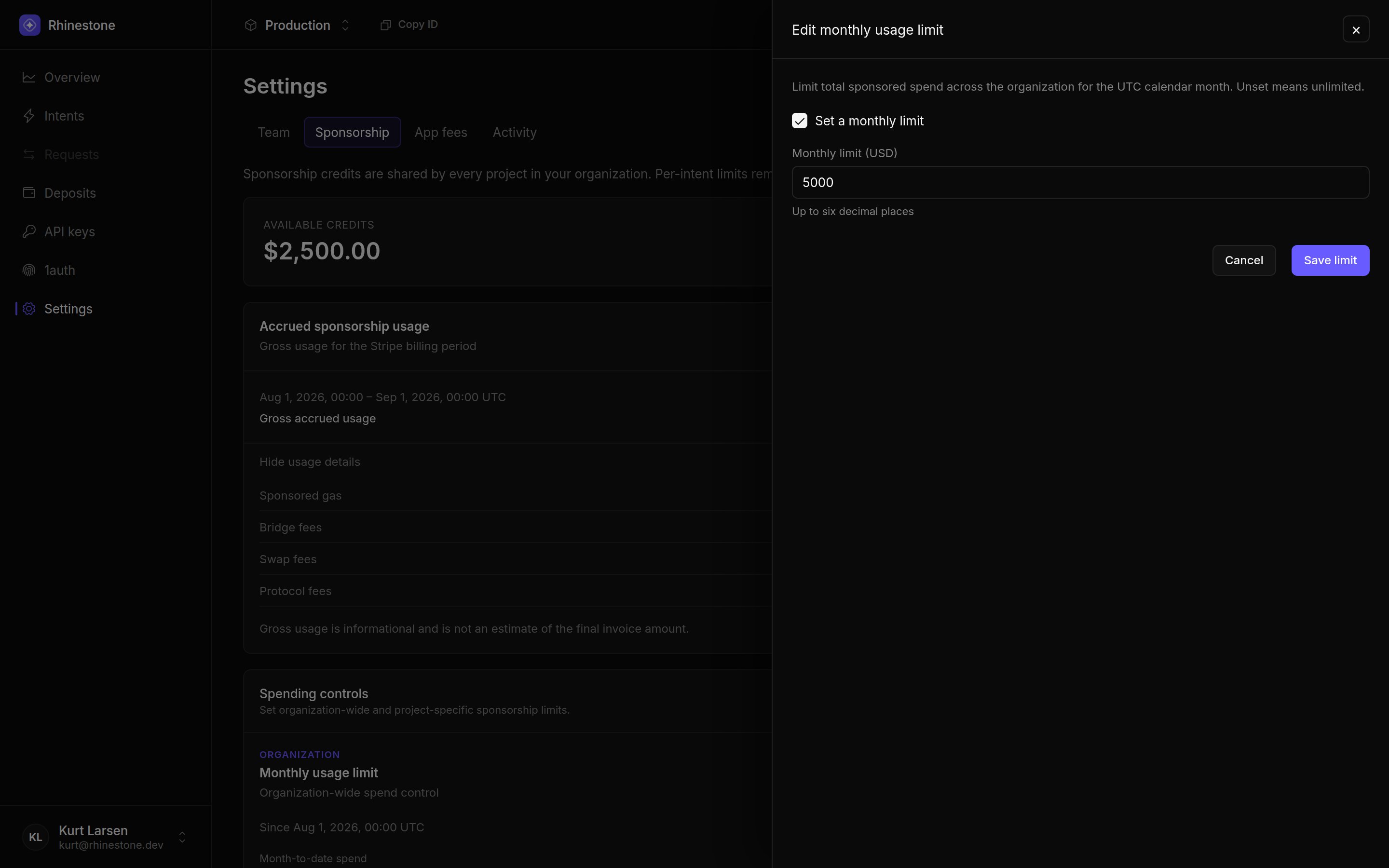 Unset limits are unlimited. Project caps do not divide or reserve the organization budget; every project draws from the same organization sponsorship account. The monthly limit does not reserve funds between concurrent intents, so simultaneous admissions can exceed it before their charges are recorded. Testnet sponsorship is not metered against these mainnet limits.
Request validation answers “should this intent be sponsored?” Budgets answer
“can this sponsorship account pay for it?” Use both.
## Failure behavior
| Failure | Result | Application action |
| ------------------------------------------------------------------------------ | ----------------------------------------------------------- | --------------------------------------------------------------------------------- |
| Application session is missing or invalid | Your backend rejects the request. | Ask the user to authenticate again. |
| Backend validation or `shouldSponsor` rejects the intent | No sponsored transaction or extension token is produced. | Keep the flow unsponsored or reject it according to your product policy. |
| Token is expired, mismatched, or replayed | Rhinestone rejects authentication or the sponsorship grant. | Mint a fresh token for the unchanged request. Re-evaluate policy before retrying. |
| Project per-intent cap is exceeded | The sponsored quote is rejected. | Reduce the sponsored scope or request a new user-paid quote. |
| Organization monthly limit is reached | Sponsorship is rejected across the organization's projects. | Raise the limit or request a new user-paid quote. |
| Billing is suspended or available credits are exhausted without active billing | Sponsorship is rejected. | Restore billing or request a new user-paid quote. |
Funding affects the quote and the operations the user authorizes. A user-paid fallback always needs a new quote and user approval.
## Operational checklist
* Keep private keys and API keys in backend secret storage.
* Authenticate token-minting and transaction endpoints.
* Bind every account to the authenticated application session.
* Allowlist chains, contracts, functions, and values as narrowly as possible.
* Set project per-intent caps and an organization monthly limit.
* Log policy denials without logging tokens, private keys, or sensitive request data.
Unset limits are unlimited. Project caps do not divide or reserve the organization budget; every project draws from the same organization sponsorship account. The monthly limit does not reserve funds between concurrent intents, so simultaneous admissions can exceed it before their charges are recorded. Testnet sponsorship is not metered against these mainnet limits.
Request validation answers “should this intent be sponsored?” Budgets answer
“can this sponsorship account pay for it?” Use both.
## Failure behavior
| Failure | Result | Application action |
| ------------------------------------------------------------------------------ | ----------------------------------------------------------- | --------------------------------------------------------------------------------- |
| Application session is missing or invalid | Your backend rejects the request. | Ask the user to authenticate again. |
| Backend validation or `shouldSponsor` rejects the intent | No sponsored transaction or extension token is produced. | Keep the flow unsponsored or reject it according to your product policy. |
| Token is expired, mismatched, or replayed | Rhinestone rejects authentication or the sponsorship grant. | Mint a fresh token for the unchanged request. Re-evaluate policy before retrying. |
| Project per-intent cap is exceeded | The sponsored quote is rejected. | Reduce the sponsored scope or request a new user-paid quote. |
| Organization monthly limit is reached | Sponsorship is rejected across the organization's projects. | Raise the limit or request a new user-paid quote. |
| Billing is suspended or available credits are exhausted without active billing | Sponsorship is rejected. | Restore billing or request a new user-paid quote. |
Funding affects the quote and the operations the user authorizes. A user-paid fallback always needs a new quote and user approval.
## Operational checklist
* Keep private keys and API keys in backend secret storage.
* Authenticate token-minting and transaction endpoints.
* Bind every account to the authenticated application session.
* Allowlist chains, contracts, functions, and values as narrowly as possible.
* Set project per-intent caps and an organization monthly limit.
* Log policy denials without logging tokens, private keys, or sensitive request data.